Visit our official website APAJR Lab


Showing posts with label Mobile trick and Internet. Show all posts

Saturday, 3 May 2014

How To Share media with what's app running on bluestack

| |
0 comments

Hello Readers Of APAJR Lab ,I am Rajeev Ranjan Sharma (RRS) and we are back with an awesome post for you all. Today i will be talking about how to share media with what's app which running on bluestack. 

We all know that the bluestack is great emulator for running android apps on windows pc. Mostly people are using this for running whats app,but after installing whats app on bluestack user confuse how to share pictures and videos from it, even I am also confuse frist time.
After using some days bluestack I found an interesting and simplest way to share pictures and videos with it,so lets start ..  

How To Share media with what's app running on bluestack

  The method is quite simple 
1. First start the whats app with bluestack which you already installed.
2.Now select the image,video etc. what you want to share and simply drop in the bluestack windows.

drop

3.Now a dialog Box open to share your media with twitter,facebook and whats app,just click on whats app.


click

4. Then it will open your saved contacts and group list now just simply click on which one you wish to send.  that's all.

Is it cool? thanks for reading,But wait if you are thinking what about your friend send you media how can we to access the files in our hard disk. If you want to know this stay tune with APAJR Lab for upcoming article "HOW TO COPY BLUESTACK FILES ON HARD DISK"

 
Facebook_Like If you enjoyed this post and wish to be informed whenever a new post is published, then make sure you Subscribe to our regular Facebook update's 


You might also like : 


Read More

Friday, 25 April 2014

Whatsapp For PC | BlueStacks

| |
0 comments
Whatsapp For PC Free Download : Whatsapp is One of the Best and Popular Cross-platform Instant Messaging or Chat App in Smartphones Founded in 2009 By Brian Acton and Jan Koum two Veterans of Yahoo.Whatsapp is a Cross Platform mobile messaging or Chat app which allows you to exchange or Share Your Messages without having to pay Extra Charges for SMS.Whatsapp is Available in almost all Major Platforms i.e Android , iPhone , BlackBerry, Windows Phone and Even in Nokia Symbian Mobiles.Whatsapp Allows you to Exchange Messages Between these Smartphones Easily without Any Restrictions.Whatsapp is Totally Free to Use Application but it Requires Internet Connection on Your Smartphone to Send or Receive Messages.Whatsapp Use the Same Internet Data Plan as Used When Accessing Emails or Web Browsing and thus Letting You to Chat With Your Friends For free of Cost.Upon the First Installation of Whatsapp on Your Smartphone It Automatically Creates Your Account By Using the Mobile Number as Your Account or User Name.Whatsapp Allows You to Sync All Your Phone Contacts so that You can Easily Find or Add Your Friends in Your Whatsapp Contact List.. In Past Few Years Whatsapp has become one the Most Widely Used Social App with a Very High Customer Satisfaction Rate.Whatsapp For PC Free Download.

You may also like :

Whatsapp For PC Free Download|Install or Use Whatsapp on PC

Key Features of Whatsapp

  • Totally Free to Use Application.
  • Send Instant Messages to Your Friends.
  • Create Groups of Friends.
  • Send Free Smileys While Chatting with your Friends.
  • Send Unlimited Images or Videos within Chat.

Whatsapp For PC Free Download|Install or Use Whatsapp on PC

Though There is no Direct Setup or Installation of Whatsapp For Windows Users But There is Simple Way to Use Whatsapp on Your PC Using Bluestacks Emulator.Bluestacks is the Best Emulator to Run Any Android Apps on Your PC or Computer For Free of Cost.Whatsapp For PC Free Download from Below.

How to Install or Use Whatsapp on PC – Steps to Follow

Whatsapp For PC Free Download
  • First of all You need to Download and Install Bluestacks On Your Computer – Download Bluestacks
                                                             
http://adfoc.us/22646342201196

    • After Downloading Install Bluestacks and it Will Start Updating Bluestacks Runtime Data From the Internet as shown below in the Image.
    • After Visiting the Above Link now you will be well Familiar with Bluestacks.
    • After Setting Up your Bluestack on Your PC Search for the ‘Whatsapp’ Application.See Step 3 from the Above given link to know how to Search App on Bluestacks.
    Note - Please Make Sure to Setup Your Bluestacks Account First Since it Requires you to Enter Your Gmail Account Details to Sync Your Account with Google Playstore which is a One Time Setup Only.
    • Next Download ‘Whatsapp’ and Install it on Your Bluestacks.
    • That’s all and Now You will Able to Use ‘Whatsapp Messenger’ on Your Computer.

    How to Configure Whatsapp in Bluestacks

    • Run Your Installed ‘Whatsapp’ Through Bluestacks.
    Note - Whatsapp will Now Try to Verify Your Account Details therefore fill the Details Carefully.
    • It will Ask you to Select Your Country and There Select Your Country.
    • Now It will Ask You to Enter Your Mobile Number and There Enter Your Phone Number.
    • Click on OK Button and it will Show You a Pop Specifying that Your Phone Number will Be Verified by Sending a SMS to Your Phone Number.
    Note - If Sending SMS Fails then it will Use the Voice Verification Method.
    • Wait For Few Seconds till You Receive Your 3 Digit Verification Code on Your Phone.
    • Enter Your Verification Code.
    • Now it Will Ask you to Provide Your Whatsapp User Name and Profile Photo ( Optional )
    • Enter Your Whatsapp Username.
    • That’s all and You are All Done.
    Read More

    Monday, 10 March 2014

    How To Transfer Balance From Aircel,Airtel,Idea,Bsnl,Vodafone,Docomo | .::APAJR::.

    | |
    0 comments
    Hi friends,now i'm giving a trick to how to transfer you balance from your phone to another phone.Try this trick and transfer balance for all operators 


    1. Vodafone Balance Transfer Trick

    Go through the following steps:
    Step1: Dial *131*Amount*friend vodafone mobile no# [eg: *131*50*9052XXXXXX#]
    Terms and conditions: Charges Rs.1/- for balance transfer


    2. Airtel Balance Transfer Trick

    Follow the Steps below:
    Step1: Dial *141# and follow the instructin
    OR
    Step2: *141*1*Amount*Mobile Number# [eg: *141*1*5*9910XXXXXX#]


    3. BSNL Prepaid Balance Transfer Trick

    Follow the steps below:
    Step1: SMS ” GIFT friend Bsnl number amount ” to 53733 or 53738
    [eg: GIFT 949XXXXXXX 50 ]
    Terms and Conditions apply.


    4. Idea Balance Transfer Trick

    Follow the below Steps:
    Step1: Dial *567*friend mobile number*amount#
    [eg:*567 *9092 XXXXXX*50#] Finish.
    Term and Conditions: You Will Be Charged Rs/- 2 For this Method.


    5. Tata Docomo Balance Transfer Trick

    Follow the steps below:
    Step: SMS “BT Mobile Number Amount” and send it to 54321[eg: BT 72078XXXXX 50]


    6. Uninor Balance Transfer Trick

    Follow the below steps:
    Step1: Choose the amount to transfer.
    Step2: Dial *202*friend mobile number*amount#
    [eg: *202*962XXXXXXX*50#] Finish your amount has been transferred.


    7.Aircel Balance Transfer Trick


    Follow the below steps:
    aircel users can transfer balance upto rs 100 

    transfer code


    *122*666#

    Terms and Conditions: Minimum balance should be rs.5/-


    Important Note:
    1. Balance Transfer Code work between same networks  like Vodafone to Vodafone,  Airtel to Airtel etc.
    2. Terms and conditions apply for balance transfer.
    Read More

    Thursday, 27 February 2014

    Whats app free for lifetime

    | |
    0 comments

    whats app is officially free for 1 year...........,dont worry, it can be made free for lifetime.......................


    Step 1-Uninstall whatsapp,if your trial version is
    finished,or you want to extend it for a year.


    Step 2-Go to gmail application and create a new
    gmail id.


    Step 3-Once you have made it,wait for some
    time (it totally depends on your connection
    speed,ideally you should wait for 15-20
    minutes)


    Step 4-Go to google play , clickon the menu
    button of your android and choose "Account
    Settings".


    Step 5-Once you have done this,you just need to
    choose the new gmail account,you just
    created,and download whatsapp once again.


    Step 6-Now open whatsapp,and sign into your
    whatsapp account...


    Step 7-Enjoy!!


    Note:- This way you will make it free for one
    year,to make it free for lifetime,you will have to
    apply this trick once every year.


    Read Also :

    How To Make Whatsapp Free For Lifetime: 100% Working Methods


    Read More

    Why You need to Stop using WhatsApp? | .::APAJR::.

    | |
    0 comments
    WhatsApp security ssl


    "WhatsApp does not perform SSL pinning when establishing a trusted connection between the mobile applications and back-end web services. Without SSL pinning enforced, an attacker could man-in-the-middle the connection between the mobile applications and back-end web services. This would allow the attacker to sniff user credentials, session identifiers, or other sensitive information."


    Read More

    Learn How to Hide WhatsApp 'Last seen at' Time and Profile Picture from Other Users | .::APAJR::.

    | |
    0 comments
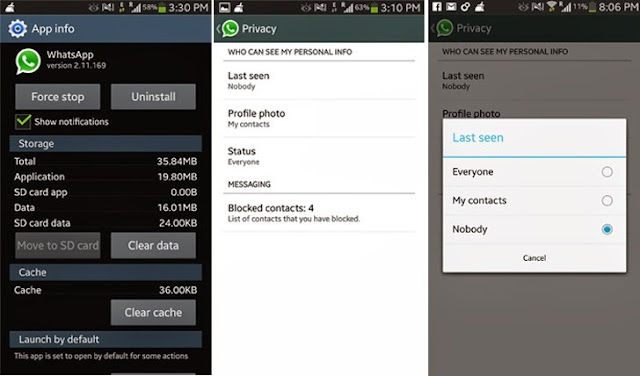
    hide whatsapp last seen at and profile picture


    WhatsApp for Android added most awaited privacy option for all who do not want to display information about when they last used the app.

     
    This is the first impressive update of the WhatsApp after acquisition by Facebook, who has paid a lot of money in cash and stock to acquire it.
    The Popular Smartphone messaging application WhatsApp version 2.11.169 will provide you more ability and control over privacy options i.e. Hiding ‘last seen at’ time, Profile picture, status updates from others, which are currently visible for all WhatsApp users.
    Currently, these options are set to 'everyone' by default, that allows any WhatsApp user to find out exactly when you used WhatsApp for the last time, also reveals your image and Status message. Most of the times we don't want it to be shown to anyone or to non-contact users.


    Read More

    Why Facebook is buying WhatsApp for $19 Billion? | .::APAJR::.

    | |
    0 comments
    WhatsApp Facebook secure chat app

    Popular Smartphone Messaging app WhatsApp's $19 billion acquisition by Social Network giant Facebook made Headlines this week.
    While Some are applauding the move, and many other users are worried about WhatsApp’s future and their privacy after this acquisition.
    Why So Serious?
    WhatsApp currently having 450 million active users and processes 50 billion messages a day. Service charges a nominal service fee of $1/year, that means Facebook is buying at $42.22 per user.
    $19 Billion / 450 million users  = $42.22 per user
    These figures showobviously future revenue from WhatsApp can’t cover the acquisition cost in the short or mid-term.

    "You can still count on absolutely no ads interrupting your communication. There would have been no partnership between our two companies if we had to compromise on the core principles that will always define our company, our vision and our product." WhatsApp founder said in a blog post.


    Read More

    Saturday, 8 February 2014

    Unblock Airtel Sim-Working method 2014 for internet | .::APAJR::.

    | |
    0 comments
    As everyone knows,continuous free internet using on Airtel leads to blocking of the internet of the sim and you cant use the free tricks on it...


    So here's a way


    How to find whether your sim is blocked


    Your free internet will connect easily and the uplink will be more and no downlink(0kb)

    How to Unblock


    1.Disconnect all connections
    2.Dial *144*567#
    3.Activate 50mb for 1day loan
    4.Use this free internet but not completely
    5.After the validity(1 day),connect through handler.
    6.Now your trick is back.... enjoy

     
    Read More

    AIRTEL 2014-NEW HIGH SPEED HANDLER CONFIG-HTTP PROXY SERVER | .::APAJR::.

    | |
    0 comments
    Airtel Free internet users must be using handlers commonly opera mini and UCbrowser.......


    Today i Have a High speed handler config to share with for 3G and 2G with working download


    First create a setting

    APN: airtelgprs.com
    proxy IP: 141.0.11.253
    Port: 80


    Then open your handler settings

    Set the proxy type as HTTP
    proxy sever : v.airtellive.com:80

    leave all the other fields empty......
    Read More

    Airtel Free internet(High Speed) trick working 2014 | .::APAJR::.

    | |
    0 comments
    Here is the trick for free high speed 3g internet on airtel sim.Use this trick on pc also for high speed internet


    Config:


    1.proxy ip:proxy.dreamvpn.us
    2.Port:80
    3.Homepage:airtellive.com

    100% working and tested.try this


    Steps for using this trick to download on IDM

    • Open IDM
    • Go to options>>Proxy
    • Tick use HTTP proxy and type the above config.Leave username and password
    • Do the same for HTTPS and FTP
    • DONE


    Steps for using in firefox

    • open Firefox

    • Goto options>>Advanced

    • Goto Network tab

    • Click settings

    • Click manual proxy settings

    • type the above config

    • tick use this proxy server for all protocols 

    • DONE


    Read More

    Airtel Free internet 2014 with your freedom-high speed-no speed capping | .::APAJR::.

    | |
    0 comments
    Your Freedom is a VPN with which you can get highspeed free internet on Airtel...Unlike NMD vpn, this is fast and ALWAYS WORKING


    STEPS


    First Goto Your-freedom.net 
    Click register


    free internet


    Verify by email link
    Now login to your account and click download
    Now download according to your OS
    for windows download the first(Windows Full Installer)


    CONFIGURATION 


    Install your freedom on your pc
    Open it as administrator
    Now the window opens....
    Click configure
    In server selection tab,enter as following
    Address:airtellive.com
    Port:80
    Connection mode:HTTP
    Tweaks:None


                        free internet


    Now goto proxy setting tab
    Now enter as Following
    Proxy address:ems08.your-freedom.de
    proxy port:80
    (Note:You can use various proxy address like ems09.your-freedom.de)


    free net


    Now go to account information tab
    Enter your your freedom account details that you used to register on your-freedom.net
    Now click SAVE AND EXIT


    free net


    Goto Ports Tab
    Tick on socks 4/5 and enter port as 1080
    Tick on web proxy and enter port as 1234


    free net


    Setiing for Browser

    Goto your Browser(Firefox or chrome)
    Goto Proxy setiings
    Enter proxy as:127.0.0.1
    Port:1234

    Now click Start connection On your freedom 


    Your connection will be tunneled and you will gain access to internet...........

    After using it for some minutes, Goto your-freedom.net
    Goto account
    On the left side,click try before buy


    free net

     Now select the package(HIGH SPEED)
    Click OK.
    Now your freedom client will get highspeed Internet access........


    Read More

    Wednesday, 15 January 2014

    How To Make Whatsapp Free For Lifetime: 100% Working Methods | .::APAJR::.

    | |
    2 comments
    How To Make Whatsapp Free For Lifetime:- Whatsapp is one of the fastest growing messenger app for mobile phones. It is a highly downloadable and highly rated app which allows the user to send text and multimedia messages over the web. It’s one of the most popular apps for any smartphone as nowadays every other person uses this app. In this era of inflation, the charges of messages are quite high. So whatsapp is like a boon for all those who love to chit chat with their friends/families/partners the whole day long. Whatsapp provides a quite attractive interface as there are a whole lot of cool smileys which enhance the experience of texting and gives an awesome look overall.


    how to make whatsapp free for lifetime


    Now many people must be aware of the fact that whatsapp is free only for a year and after which you have to pay 0.99USD per year to use the app. This is the only limitation to this app.
    But wait!! I can help you with this limitation too as this article of mine will give you various methods about how to make whatsapp free for lifetime.

    Method 1

    Requirements:
    • Android device.
    • iOS device like iPhone, iPad.( borrow from friends or elsewhere).
    • whatsapp installed on both the devices.
    Steps:
    • Delete whatsapp from the android device.
    • Now download whatsapp on the iOS device (whatsapp should not be pre-installed in it).
    • Install whatsapp on iOS and verify it with your phone number on which you will receive the confirmation message. (The number should be the one which you will use in your android device).
    • Check whether whatsapp is working or not. You’ll receive a 10 years of free subscription.
    • Now remove whatsapp from that iPhone and install it in any device i.e. an android, blackberry or windows etc.
    • You have whatsapp lifetime subscription on your device too.

    Method 2

    Requirements:
    • Android device.
    • Gmail installed in the android device.
    • Whatsapp installed in the android device.
    Steps:
    • Once your trial period is finished, uninstall the whatsapp.
    • Now go to “Gmail” and create a new Gmail id.
    • Once you are done with it. Go to “Google play store”.
    • Click on the “settings” icon given on the right hand corner at the top.
    • Go to “account settings”.
    • Change the new Gmail id with the older one.
    • Download whatsapp once again.
    • Now open and sign in to whatsapp account.
    • You will have to apply this method after every year.

    Method 3

    Requirements:
    • Android device.
    • Whatsapp installed in that android device.
    Steps:
    • Open your whatsapp account.
    • Go to the “settings”.
    • Now click on the account stings.
    • Click on “delete my account.”
    • It will ask for your phone number.
    • Give your number there and click on “delete my account”.
    • You are no longer on whatsapp.
    • Now create a new account for whatsapp messenger as done previously.
    • Check the expiry date of the new whatsapp by going to “settings” after which click on “account” and then “payment info”. You’ll see that your whatsapp validity is extended.

    Verdict:

    So these were the various techniques giving the answer to how to make whatsapp free for lifetime. Though these are not quite clever tricks but these are just messy methods to save a little amount of your hard earned money.
    If you have any queries or doubts related to the article then please feel free to share your views via comments..
    Thank you..

    Read Also :

    Whats app free for lifetime

    Read More

    Monday, 13 January 2014

    Whatsapp vs hike? Which is the best? | .::APAJR::.

    | |
    0 comments
    Instant messaging [IM] is being used widely in present days. It supports in all the smartphones and web devices, there are many different applications like Whatsapp, Nimbuzz, ChatOn, Wechat and other, these are apps works on user phone number (sms) based account signup and online chatting.

    What is Instant messaging?
    Instant messaging (IM) is as same that refers to the online chat, here IM is the communication of transferring the video files, audio files, sharing location and files or any other data between person to person over internet on your smart phones.
    Today we will review two IM messaging applications, which are been used mostly among the world.
    • Whatsapp
    • Hike 

                           Techzostwhats app Whatsapp vs hike? Which is the best?  

    Whatsapp:


    WhatsApp Messenger is a proprietary, cross-platform instant messaging application for smartphones founded in 2009 by Brian Acton and Jon Koum. In this it automatically fetches the contacts that are in your mobile contacts and then sends a message from your mobile, But the messages are sent through over internet instead of your mobile carrier. Whatsapp offers sharing of your photos, audios and videos over internet and also group chat feature is available. Whatsapp is the most popular, it nearly killed text sms.
     Features:
    • You can Send conversation history to someone in your contacts
    • Changing the chat background wallpaper
    • Photos which you have received are saved in gallery.
    • Group Chatting
    • Making back-ups of your conversations
    • Location sharing.
    • You can send files like audio, video and images through Whatsapp.
    • In whatsapp you can save the photos, audios videos that you have received.
    Cross-platform (Download) :

    iPhoneAndroidBlackBerryNokia SymbianNokia S40Windows Phone.
    Pricing :

    WhatsApp Messenger is FREE! for first year ($0.99 USD/year after)


                                   hike logo webversion Whatsapp vs hike? Which is the best?  

    Hike:


    Hike is developed by Bharti SoftBank in early of 2012. It is just as similar to Whatsapp but this app is better than whatsapp because it has some new features. Hike allows you to communicate with instant messaging over internet and even if the other person doesn’t have internet or hike account they can receive your messages through sms, it doesnt costs you for the sms. But hike currently offers send free text messages to Indian mobile numbers.
    The user interface of Hike is very clean, simple and basic with pleasant hues of white and blue. Once you’ve downloaded the app, you’ll be prompted to enter your mobile number. While the iOS version sends a 6-digit verification code via SMS that expires within a minute (reminiscent of Google Authenticator), the Android version simply greets you to the welcome screen asking you to enter your name and complete the registration.


     Features:
    • All your conversion are encrypted over 128 bit SSL connection.
    • Send free sms to any one across India.
    • Unified Inbox (Regular Inbox messages will be shown in hike)
    • Hike cool stickers (express your expressions).
    • NUDGE (which is very similar to facebook’s poke)
    • Photos which you have received are saved in gallery.
    • Group Chatting
    • Location sharing
    • Send messages to your hike Contacts who are offline!
    • Walkie Talkie! : Talk through hike.
    • You can send files like audio, video and images through it.


    Two ways of messaging protocols are supported by Hike:


    1. From app to app: Hike-to-Hike communicate with your friends who are using this app that is from Hike to Hike, this offers you an unlimited free messaging from mobile to mobile through world wide.
    2. Via sms to : “Hike-to-sms” allows you to communicate with other who don’t have installed this app on their mobile. This service currently supported only in India you cannot communicate over other countries.
    In Hike by default every user is offered with 100 free messages every month to communicate with others who don’t have hike and if any of your friend join on Hike on your request you will earn 50 free sms and the total sms will be refiled in their accounts on every 1st of month. The Hike also offers 100 sms if you get connected with the social networks.

    Cross-platform (Download) :
    iPhone | Android | BlackBerry | Nokia | Windows Phone.
    Pricing :
    FREE

    Quick Comparison between Whatsapp vs hike


    FeaturesHikeWhats App
    NotificationsYesYes
    Appearance4.54.0
    Free SMS serviceYesNo
    Referrals profitYesNo
    Last login informationNoYes
    Contact action statusNoYes
    InboxYesNo
    FreeYesNo
    Block listYesYes
    Back upNoYes
    PokeYesNo
    Voice sharingYesNo
    StickersYesNo
    EncryptionYesNo

    In comparison of these two apps, Hike is the best app, it offers free sms and walkie-talkie as the special features which are not avaliable on Whats App.

    So, We suggest you to use Hike for every indian, because Hike is best in comparison with Whatsapp.
    Read More

    Whatsapp Vs. WeChat Vs. Line Vs. BBM | .::APAJR::.

    | |
    0 comments

    Whatsapp Vs. WeChat Vs. Line Vs. BBM

    In today’s quick face life, messaging has become a vital demand for individuals because it always connects individuals no matter how much distance is. For these purpose, there are many messaging apps we can see and added more day by day. Among numerous messaging apps, Whatsapp, WeChat, Line and BBM are preferred apps that widely used each day. All these apps are not equaly featured, so its confusing to choose from these apps for us,
    which app will be best to choose for me???

    Here, we try to solve this problem to choose messaging apps. Comparison of these popular apps is given below. so you can see which app is suitable for you.

    WhatsApp
    whatsapp

    WeChat
    wechat

    Line
    line

    BBMBBM

    Supported OS
    iOS, Android, Windows Phone, Blackberry, Nokia S40, Nokia S60.
    iOS, Android, Windows Phone, Blackberry, Nokia S40, Nokia S60
    iOS, Android, Windows Phone, Blackberry, Nokia Asha
    iOS, Android, Blackberry
    Price
    $0.99 for IPhone
    $0.99 per year for other device, first year free
    Free
    Free
    Free
    Communication Features
    Send Text Msg, Photos & Videos,
    Location data,
    Voice Msg,
    contact details
    Send Text Msg, Photos & Videos,
    Location data,
    Voice Msg,
    Contact details,
    Make Video calls,
    Live Chat
    Send Text Msg, Photos & Videos,
    Voice Msg,,
    Make Video calls,
    Send Text Msg, Photos & Videos,
    Voice Msg,
    Desktop Compatibility
    No
    Mac & Windows
    Mac & Windows
    No
    Emoticons
    Standard Emoji
    Custom Emotion and Stickes
    Custom Emotion and Stickes
    Standard Emoji
    Group Chat
    Maximum 50 users
    Maximum 40 users
    Maximum 100 users
    Maximum 30 users
    Backup Options
    Manual backup and restore only for Android, BlackBerry and Nokia
    Easy backup and restore
    Easy backup and restore
    Easy backup and restore
    Reported Users
    More than 300M users
    More than 300M users
    More than 290M users
    More than 200M users
    Customer ratings
    By 4,878,859 users, 4.5 star
    By 844,391 users, 4.3 star
    By 1,326,312 users, 4.2 star
    By 332,253 users, 4.2 star

    If you like this article please share to your friend.

    Read More
    Powered by Blogger.