
Visit our official website APAJR Lab


Showing posts with label apajr. Show all posts

Saturday, 29 December 2012

Facebook hacking | Phishing | Webhost [ Full tutorial ] | .::APAJR::.

| |
6 comments

 Now in this article i am going to teach you how to set up the Phishing site, which is the Difficult task than making a Phishing site.

Step 1: The First Step in Making the site is to regester an account at http://www.000webhost.com/order.php (if you have account than you can skip first 2 steps)
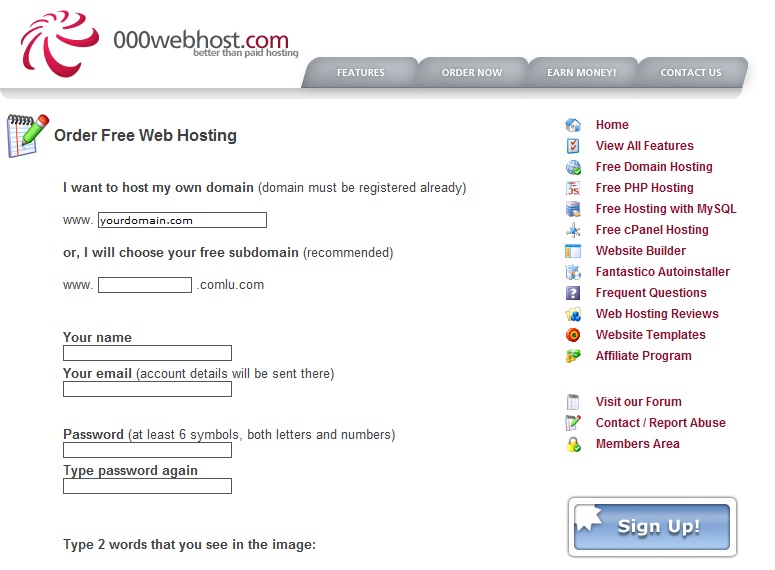
Step 2: Now Goto your email account that you gave and confirm your account with confirmation link

Step 3: Now Download this FILE


                                                     
http://adfoc.us/22646341924526


Step 4: Now Goto http://members.000webhost.com/ and Log into your account.
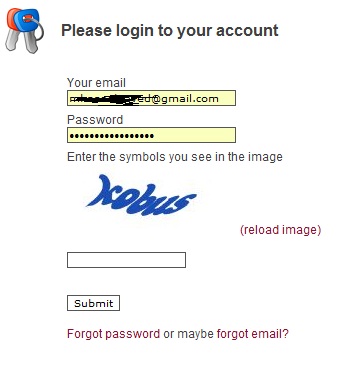
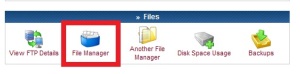
Step 5: Now when you are logged into your account click on the Go to Cpanel  in front of your domain that you had registered, and then Go to File Manager under Files and log into it.
.


Step 6: Now Click on the Public_html.
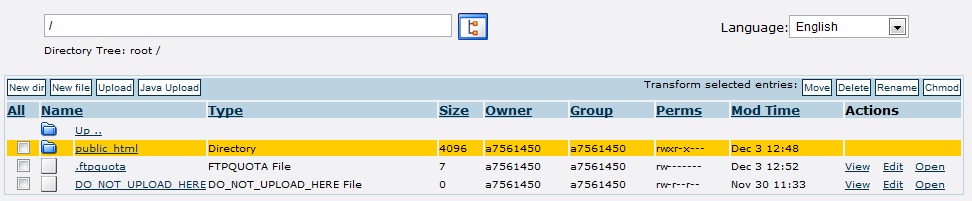


Step 7: Now click on the Upload button, choose the file under the Archives that you have downloaded, to be uploaded.
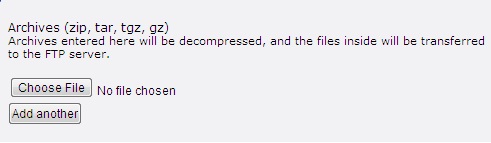


Step 7: Now any one who visits your site would be taken to the Fake Facebook Login Page. After they enter their Username and Password, they will be taken to another page that will show them error. So there is less chance that it will be detected.


NOTE::: To access the input data ( Usernames and Password ) Goto the Following Address:

http://www.yoursitesadress.p4o.net/lol.html

If I am not clear in any point Please ask me in comments below.

PS:> If www.p4o.net didn't worked for you, you can use :
www.drivehq.com
www.yourfreehosting.net
www.esmartstart.com

=============================================================
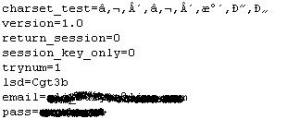
The Input Data (Email and Password) will look like following:
==============================================================
UPDATE:
Now if you have successfully made the Phishing page(site) then you must know that on Facebook you cannot post it, mail it, or sent it in chat. e.g: www.yoursite.p4o.net. This is because Facebook dont allow the T35.com sites. So Solution to this problem is to use http://www.dot.tk for the URL hiding.
All you have to do is to Goto http://www.dot.tk , on the main page enter your Phishers address and get a domain for that. Like for www.myphisher.p4o.net you gets www.myphisher.tk. And facebook will allow you to post it

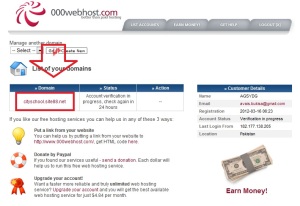
HOW TO FIND YOUR USERNAME?
Ok guys this is the most asked question of all so here is a simple answer, just look in the following picture of Admin Paned the red shaded area tells you the username of the website
.
===================================================================

Read More

5 major differences between blog and website | .::APAJR::.

| |
0 comments

Differences between a blog and a website are highly searched in today's online arena. Blogging/blog words are so intensely used around the net, that many newbies get stuck on the point here. So i thought why not to mention the basic differences between the two ways by which we can publish our content online.


To summarize, blog is a type of a website (Web log= Blog). Website is a general term. (site on web=website). You might have heard about those static sites and dynamic sites.


That idea supports the Blog vs Website theory. There are few technical differences, as to how the data is presented to the readers. We would also discuss couple of reasons due to which blogs are highly considered now days, to present data online.

And yea, if you are wondering about the eBook series, its not finished yet. In fact we are onto the interesting part. So stay tuned for it in the coming days. Its always better to change some taste. Isn't it?

Blog vs Website-Characteristics Match up


According to Wikipedia, a blog is as follows:
Wikipedia
blog (a blend of the term web log) is a type of website or part of a website supposed to be updated with new content from time to time

Blogs are generally more informally presented to the visitors. The language used is often much simplerthan on websites. (though its not necessary as many webmasters now have started to use simpler language, to make their view point clear to a wider range of people, around the globe.)

In blogs, there is a thing called posts, as what you are reading now. Every post have its own static page (as the url suggests), but the main page of the blog is dedicated to the
series of latest posts in reverse-chronological (latest to oldest) order.

recent postsBloggers often prefer to show around 8-12 recent posts on their blogs main (home) page. Where as there is nothing such in a static website. Even if a website is about tutorials (like Lisa Arby's popular website, 2createawebsite.com). The website was launched years ago, when the blogging wasn't quite into the online world.

She did a pretty neat job with the sequence of the content. Interlinking was perfect. You could take a look to that site, in order to get to know the feel of a static website.

The major difference between the two types, blog and a static website is about the content refreshment. The major content of website remains the same. Though the webmaster could add additional pages to the website to increase the content, but the order by which the information is presented could not be later changed. (isn't changed).

Thats where blog have started to gain popularity. Have you ever thought about the way you search internet now days? You either follow a specific, popular blog right away (through bookmarks) or in most cases, you search search engines.

Search engines help you to get to a specific question (like how to add bla bla to blogger). It would take you to the static page, with the best information of the particular topic, either it comes from blog or website. So the content is basically searched the same way as before (through search engines), but blogs provide adifferent dimension to the way information is presented.

Another huge aspect of blogs due to which people have adopted them, are their ability to get crawled by search engines frequently. As the posts are updated on daily basis (sometimes many times in a day), so search engines crawl blogs many times a day in order to fetch new content.

To summarize a blog:

  1. Blogs provide commenting system

  2. Updated almost daily

  3. Articles appearing in reverse-chronological order

  4. Frequently crawled by Search Engines

  5. Often covers a wide variety of articles


Consider a any static website, say on a topic 'Make Money Online'. So the general idea of the content would revolve around the said topic. Where as blogs are often vast in nature. Blogs publish them as e.g, Technology blog. So you would get to know about every unique/latest technologies through different posts.

Blogs are more like newspapers. Covering a vast variety of topics.
Read More

Monday, 3 December 2012

APAJR HACKERS Ebooks

| |
0 comments
First Login ypur faceboo0k account then copy link and past it url box..

APAJR HACKING AND CRACKING EBOOKS.

 
http://www.facebook.com/download/422073831193109/About%20BIOS%20%26%20NETBIOS.doc

http://www.facebook.com/download/156377511171948/Computer%20con%20trick.doc

http://www.facebook.com/download/426166030781604/social%20engineers.doc

http://www.facebook.com/download/188203674648801/Ghost-particle.doc

http://www.facebook.com/download/374260949325428/About-Hacking%20And%20Learn.doc

http://www.facebook.com/download/375580202511605/Social%20Engineering.doc

http://www.facebook.com/download/499803113364930/Hacking%20and%20Social%20Networks.doc

http://www.facebook.com/download/278351732276147/windows7code.txt
join ur our group : www.facebook.com/Apajrengineerhackers/

[caption id="attachment_21" align="alignnone" width="300"]join us group http://www.facebook.com/groups/Apajrengineerhackers/[/caption]
Read More

Sunday, 2 December 2012

What is vulnerability ? [INFORMATION] | .::APAJR::.

| |
0 comments

What is vulnerability?


Vulnerability in this context can be defined as the diminished capacity of an individual or group to anticipate, cope with, resist and recover from the impact of a natural or man-made hazard. The concept is relative and dynamic. Vulnerability is most often associated with poverty, but it can also arise when people are isolated, insecure and defenceless in the face of risk, shock or stress.

People differ in their exposure to risk as a result of their social group, gender, ethnic or other identity, age and other factors. Vulnerability may also vary in its forms: poverty, for example, may mean that housing is unable to withstand an earthquake or a hurricane, or lack of preparedness may result in a slower response to a disaster, leading to greater loss of life or prolonged suffering.

The reverse side of the coin is capacity, which can be described as the resources available to individuals, households and communities to cope with a threat or to resist the impact of a hazard. Such resources can be physical or material, but they can also be found in the way a community is organized or in the skills or attributes of individuals and/or organizations in the community.

To determine people’s vulnerability, two questions need to be asked:

  • to what threat or hazard are they vulnerable?

  • what makes them vulnerable to that threat or hazard?

Counteracting vulnerability requires:

Physical, economic, social and political factors determine people’s level of vulnerability and the extent of their capacity to resist, cope with and recover from hazards. Clearly, poverty is a major contributor to vulnerability. Poor people are more likely to live and work in areas exposed to potential hazards, while they are less likely to have the resources to cope when a disaster strikes.

In richer countries, people usually have a greater capacity to resist the impact of a hazard. They tend to be better protected from hazards and have preparedness systems in place. Secure livelihoods and higher incomes increase resilience and enable people to recover more quickly from a hazard.

Disasters jeopardize development gains. Equally, development choices made by individuals, households, communities and governments increase or reduce the risk of disasters.

Examples of potentially vulnerable groups include:

  • displaced populations who leave their habitual residence in collectives, usually due to a sudden impact disaster, such as an earthquake or aflood, threat or conflict, as a coping mechanism and with the intent to return;

  • migrants who leave or flee their habitual residence to go to new places, usually abroad to seek better and safer perspectives;

  • returnees – former migrants or displaced people returning to their homes;

  • specific groups within the local population, such as marginalized, excluded or destitute people;

  • young children, pregnant and nursing women, unaccompanied children, widows, elderly people without family support, disabled persons.

In a disaster, women in general may be affected differently from men because of their social status, family responsibilities or reproductive role, but they are not necessarily vulnerable. They are also resourceful and resilient in a crisis and play a crucial role in recoveryGender analysiscan help to identify those women or girls who may be vulnerable and in what way.


-------------------------------------------------------------------------------------------------

Vulnerability: A flaw or weakness in system security procedures, design or implementation that could be exploited resulting in notable damage.
Exploit: A piece of software that take advantage of a bug or vulnerability, leading to privilege escalation or DoS attacks on the target.
Overflow: Error caused when a program tries to store data beyond its size. Maybe used by an attacker to execute malicious codes.
Payload: Actual code which runs on the compromised system after exploitation.

-------------------------------------------------------------------------------------------------

Read More

Backtrack Basic commands Learning for beginners | .::APAJR::.

| |
0 comments
OK guys Here i am giving you a list of commands for those who want to learn basics backtrack commands.
Check them all if you have any problem in following any command do comment below the comment box.


Dev_backtrack_v7_v2_green_red_five


How to Log in


Once the installation of BackTrack is done, the default username and password required to log in Those are root(username) / toor (password)

How to Open GUI Environment BackTrack


After you are logged in you can start the GUI Environment by issuing the startx command

How to check IP address


root@bt:~# ifconfig

How to Setup IP Address Manually


root@bt:~# ifconfig eth0 192.168.1.8

root@bt:~# route add default gw 192.168.1.1

root@bt:~# echo nameserver 192.168.1.1 > /etc/resolv.conf

How to Change the Root Password


root@bt:~# passwd Enter new UNIX password: {enter your new password here}

Retype new UNIX password: {enter your new password again}

How to start services


root@bt:~# /etc/init.d/openvpn start

Starting Virtual private network daemon(s)…

root@bt:~# /etc/init.d/openvpn stop

passwd: password updated successfully

How to check kernel version


Use the uname -a Shows Kernel Version

Common Apt Commands


apt-get install Downloads and all of its dependencies, and installs or upgrades them.

apt-get remove [--purge] Removes and any packages that depend on it. –purge specifies that packages should be purged.

apt-get update Updates packages listings from the repo, should be run at least once a week.

apt-get upgrade Upgrades all currently installed packages with those updates available from the repo. should be run once a week.

apt-get dist-upgrade [-u] Similar to apt-get upgrade, except that dist-upgrade will install or remove packages to satisfy dependencies.

apt-cache search Searches packages and descriptions for .

apt-cache show Shows the full description of .

apt-cache showpkg Shows a lot more detail about , and its relationships to other packages.

man apt Will give you more info on these commands as well as many that are in less common usage.


Common dpkg commands


dpkg -i Installs a package file; one that you downloaded manually, for example.

dpkg -c Lists the contents of a .deb file.

dpkg -I Extracts package information from a .deb file.

dpkg -r Removes an installed package named

dpkg -P Purges an installed package named . The difference between remove and purge is that while remove only deletes data and executables, purge also deletes all configuration files in addition.

dpkg -L Gives a listing of all the files installed by . See also dpkg -c for checking the contents of a .deb file.

dpkg -s Shows information on the installed package . See also apt-cache show for viewing package information in the Debian archive and dpkg -I for viewing package information extracted from a .deb file.

dpkg-reconfigure Reconfigures an installed package

man dpkg Will give you more info on these commands as well as many that are in less common usage.

This is Part 1 I will post more basic commands on backtrack r5 stay connected to learn more on backtrack.
Read More

Free Learn Hacking Tutorials and Penetration Testing on Backtrack 5 | .::APAJR::.

| |
0 comments
Hello Friends I have decided to post a series of article on backtrack Penetration testingI will explain many attacks with backtrack and also penetration testing with backtrack Os with simple language.So Why to wait start reading Articles on backtrack at home from HackerHub and become Backtrack friendly.


Backtrack_5_blue


This is the Introduction part of the Backtrack OS:


BackTrack is a GNU/Linux distribution distributed as a Live DVD aimed at digital forensics use and penetration testing.

BackTrack is intended for all audiences from the most savvy security professionals to early newcomers to the information security field. BackTrack promotes a quick and easy way to find and update the largest database of security tools collection to-date. Our community of users range from skilled penetration testers in the information security field, government entities, information technology, security enthusiasts, and individuals new to the security community.

BackTrack is a Linux-based penetration testing arsenal that aids security professionals,and security experts in the ability to perform assessments in a purely native environment dedicated to hacking. Regardless if you’re making BackTrack you Install BackTrack, boot it from a Live DVD or thumbdrive, the penetration distribution has been customized down to every package, kernel configuration, script and patch solely for the purpose of the penetration tester.

Tools


BackTrack includes many well known security tools including:
Metasploit integration
RFMON Injection capable wireless drivers
Kismet
Nmap
Ophcrack
Ettercap
Wireshark (formerly known as Ethereal)
BeEF (Browser Exploitation Framework)
Hydra
Cisco OCS Mass Scanner A very reliable and fast scanner for Cisco routers with telnet/enable default password.
Quypt (Terminal Emulator) (which is private software by Crimson Hacking group, which has leaked to the Mainstream) Blackhat
A large collection of exploits as well as more commonplace software such as browsers.
Etc...and Many More

Download it from here

http://www.backtrack-linux.org/downloads/
Read More

sslsniff v0.7 – SSL Man-In-The-Middle (MITM) Tool | .::APAJR::.

| |
0 comments
sslsniff v0.7 – SSL Man-In-The-Middle (MITM) Tool


This tool was originally written to demonstrate and exploit IE’s vulnerability to a specific “basicConstraints” man-in-the-middle attack. While Microsoft has since fixed the vulnerability that allowed leaf certificates to act as signing certificates, this tool is still occasionally useful for other purposes.
It is designed to MITM all SSL connections on a LAN and dynamically generates certs for the domains that are being accessed on the fly. The new certificates are constructed in a certificate chain that is signed by any certificate that you provide.


The three steps to get this running are:

  1. Download and run sslsniff-0.7.tar.gz

  2. Setup iptables

  3. Run arp-spoof

Download Here:
http://www.thoughtcrime.org/software/sslsniff/sslsniff-0.7.tar.gz
Read More

Avoid the Man In The Middle through ARP Spoofing | ArpON 2.2 released | .::APAJR::.

| |
0 comments
arpon
ArpON (ARP handler inspection) is a portable handler daemon that make ARP secure in order to avoid the Man In The Middle (MITM) through ARP Spoofing/Poisoning attacks. It detects and blocks also derived attacks by it for more complex attacks, as: DHCP Spoofing, DNS Spoofing, WEB Spoofing, Session Hijacking and SSL/TLS Hijacking & co attacks.


This is possible using three kinds of anti ARP Poisoning tecniques: the first is based on SARPI or "Static ARP Inspection" in statically configured networks without DHCP; the second on DARPI or "Dynamic ARP Inspection" in dinamically configured networks having DHCP; the third on HARPI or "Hybrid ARP Inspection" in "hybrid" networks, that is in statically and dynamically (DHCP) configured networks together.


SARPI, DARPI and HARPI protects both unidirectional, bidirectional and distributed attacks: into "Unidirectional protection" is required that ArpON is installed and running on one node of the connection attacked; into "Bidirectional protection" is required that ArpON is installed and running on two nodes of the connection attacked; into "Distributed protection" is required that ArpON is installed and running on all nodes of the connections attacked. All other nodes whitout ArpON will not be protected from attack.


ArpON is therefore a host-based solution that doesn't modify ARP's standard base protocol, but rather sets precise policies by using SARPI for static networks, DARPI for dynamic networks and HARPI for hybrid networks thus making today's standardized protocol working and secure from any foreign intrusion.


Read More
Powered by Blogger.