Visit our official website APAJR Lab


Saturday, 2 March 2013

Search Engine Optimization (SEO) | .::APAJR::.

| |
0 comments


Search engine optimization or SEO is the hottest way to drive targeted traffic to your website. Maximizing the benefits of a well optimized website will yield lots of earnings for the marketer. However, optimizing your site might cost you thousands of dollars if you are not skilled in this area.

But to tell you the truth, you can essentially get information on low cost SEO anywhere in the Internet. But only several really show you how to work out an affordable search engine optimization endeavor. And those few that really inform include this article.

Keyword Research Tools
-------------------------------
You must do keyword research before you start optimizing your site, that much is obvious, but what tools should you use?
There are two excellent keyword research tools that I can recommend as professional tools. They are Wordtracker and Keyword Discovery. Both are great and both are different. Firstly start with with Wordtracker and then move over to Keyword Discovery after a year or so.

If you optimize a site with the wrong keywords you may end up with a high ranking site but won't convert your traffic! Correctly identifying the best keywords and search terms using a keyword search tool will help your odds of success and give you a fighting chance to target prospects who are more likely to turn into clients.

Check it out if you would like more information.
1. http://www.wordtracker.com/
2. http://www.keyworddiscovery.com/
3. http://www.seoscribe.com/

Use The META Description Tag
----------------------------------------
All websites should use the HTML <META> description tag. If you have too many pages to add it to, at least put in on your home page and any core pages that bring in search result traffic. Google will use the META description you place on your site if the user searched for a keyword that exists in the META description. Google is giving us some measure of control.

Create a Website Sitemap

-------------------------------
Some SEO tips can be hard to explain, but this is one of the few that is relatively easy to do and can be done manually with small or large sites. Create a sitemap of your website. There are a few good reasons to do this.
It allows easier indexing of your site by the search engines.
In other words, it helps the search engines to find all the pages on your site. Some websites only have a few of their pages in the search engines and this can be due to poor linking, sparse navigation or a host of other reasons.
It provides PageRank or link popularity to all pages it links to.
If you read about SEO then you have read how important it is to have high-quality links poiting to your site from the sites.
A sitemap can become another source of quality links with descriptive text for your own pages. Making navigation easier by including a sitemap is just good business sense as well as SEO sense.

Example: http://www.xyz.com/sitemap/


Duplicate Content & URL Canonicalization
-------------------------------------------------------
Before we get into this exclusive tip, let me provide a definition for the term Canonicaliztion.
"It is the process of converting data that has more than one possible representation into a standard canonical representation."
If your site has multiple pages with the same content possibly through a Content Management System(CMS) or through duplicate navigation, or because it actually exists in multiple versions, you could be hurting your search engine ranking results.

Most often this problem can be found on a site's homepage. For example: Search engines view your homepage as having more than one version. How? take a look at the following urls. All point to the same page, but to the search engines they are different. http://www.yoursite.com, http://yoursite.com, http://yoursite.com/index.html and http://www.yoursite.com/index.html. The search engines may find up to four home pages that have the same content.
While this may not cause your site to be unranked it is certainly not helping and can easily cause poor rankings. That is shame for something that is so easily corrected. Most often this is caused by links pointing to different versions of your site. You can't change all the links coming into your site, but you can use the 301-redirect to solve this by pointing all versions of your homepage to the full url.

You can read more at the following links:
1. http://en.wikipedia.org/wiki/Canonicalization
2. http://www.bigoakinc.com/blog/how-to-do-a-301-redirect/


Social Bookmarking
-------------------------
Social bookmarking involves saving bookmarks (web addresses) to public Web site such as Digg or Del.icio.us so you can access these bookmarks from any computer connected to the web. Your favorite bookmarks are also available for others to view and follow as well, hence the social aspect. If you wish to create your own social bookmarks, you must register with a social bookmarking site.
Bookmark sites you generally would like to share or feel are valuable, which of course can contain bookmarked web addresses of your own site. If enough people agree with the value of a bookmark you have placed they will bookmark it to and as the popularity grows your site traffic will grow.
Don't abuse this by submitting every page of your site, try to be judicious and think about what pages of your site may be helpful and of interest to other web surfers.

Here are some of the more popular social bookmarking sites:
1. Digg
2. Del.icio.us
3. StumbleUpon
4. Reddit
5. Squidoo

Get To Know Google Services
------------------------------------
What would an SEO Consultant's life be like without Google?
I've listed many services that Google offers and I'm sure you may be a bit surprised at how many different pies the search giant's thumb is actuall in.
Google Webmasters: http://www.google.com/webmasters
Google Analytics:     http://www.google.com/analytics
Google AdSense:       http://www.google.com/adsense
Google Answers:       http://answers.google.com/
Google Blog Search:  http://blogsearch.google.com/
Google Bookmarks:  http://www.google.com/bookmarks
Google Directory:     http://www.google.com/dirhp
Google Groups:         http://groups.google.com/
Google Sitemaps:      http://www.google.com/webmasters/sitemaps/


Search Engine & Directory Submissions

-----------------------------------------------------------
Directories are an easy way to build links because anyone can submit age get listed. Directories can, therefore, be of little use for the same reason. Of course getting in directories can be time consuming but it is a one-time affair and usually worth the time. They provide one-way links which will increase your online presence. Not all directories are created equal and paying for the better ones is often money well spent.

Select the best category for your site and follow the instructions on the submission form carefully. Write your descriptions without sensational text. Descriptions of sites should describe the content of the site concisely and accurately When submitting to directories, make sure to vary anchor text and use keywords in the description and title fields.

Choose the most appropriate category for your site. Finding a category that best matches your site's theme or content will increase traffic from the directory and provide higher quality one-way link to your-site for the search engines to follow.

A few of the more search engine friendly directories for valuable links are the following:
1. http://dir.search.yahoo.com/?fr=yfp-t-501
2. http://www.dmoz.org/
3. http://www.business.com/
4. http://bestoftheweb.com/
5. http://www.avivadirectory.com/


Read More

Hack Windows Admin | .::APAJR::.

| |
0 comments


Today, i am going to show you many aspects of the Windows Password Storage path, Method of Encryption, and breaking into Windows by cracking the admin password. We need this often for many reasons:
1) Sometime we have forgotten our old password and Hint isn't helping out.
2) We want to break into someone computer to get the information.
3) Just want to take revenge from someone.
4) Stealing computer data.

Lets, take a deep dive in Cracking Windows password and also where these are stored and in which format.

SAM file and Password Hashes~Place where these passwords are stored in Hashes:
Password Hashes - When you type your password into a Windows NT, 2000, or XP login Windows Seven, Vista etc Windows encrypts your password using a specific encryption scheme that turns your password into something that looks like this:


                    7524248b4d2c9a9eadd3b435c51404eddc5

This is a password Hash. This is what is actually being checked against when you type your password in. It encrypts what you typed and bounces it against what is stored in the Registry and/or SAM File. 


You can break this hash password from

www.md5hash.com

www.passcracking.ru

SAM File - Holds the user names and password hashes for every account on the local machine, or domain if it is a domain controller.

Location of SAM/Hashes:
You can find what you're looking for in several locations on a given machine.
It can be found on the hard drive in the folder %systemroot%system32config (i-e C:\windows\system32\config). However this folder is locked to all accounts including Administrator while the machine is running. The only account that can access the SAM file during operation is the "System" account.

The second location of the SAM or corresponding hashes can be found in the registry. It can be found under HKEY_LOCAL_MACHINESAM. This is also locked to all users, including Administrator, while the machine is in use.(GO to Run and Type Regedit and Hit enter, Now scroll to HKEY_LOCAL_MACHINESAM, However you may not access to it.)

So the two (Some other also) locations of the SAMHashes are:
- %systemroot%system32config
- In the registry under HKEY_LOCAL_MACHINESAM

Cracking or Breaking Into Admin Account:
How to get Hashes form SAM file?
Well, Below are the methods to do so:
1) Well, the easiest way to do this is to boot your target machine to an alternate OS like NTFSDOS or Linux and just copy the SAM from the %systemroot%system32config  folder.


It's quick, it's easy, and it's effective. You can get a copy of NTFSDOS from Sysinternals(http://www.sysinternals.com) The regular version of NTFSDOS is freeware, which is always nice, but only allows for Read-Only access. This should be fine for what you want to do, however, if you're the kind of person that just has to have total control and has some money to burn. NTFSDOS Pro, which is also by Sysinternals has read/write access but it'll cost you $299.

2) You can also get password hashes by using pwdump2 (Google It to get software ~ Search at openwall.com). pwdump uses .DLL injection in order to use the system account to view and get the password hashes stored in the registry. It then obtains the hashes from the registry and stores them in a handy little text file that you can then  paste them into a password cracking utility like l0phtcrack or John the ripper (Linux Based works well) also cain and abel can be used.

3) Import Hashes directly from l0phtcrack, and let them open to you by cracking.


Obtained Hashes? Now crack them:
Well, as i have said that these can't be reversed but somehow automated famous cracking softwares can be used to achieve the target. Yes, it is possible, All we have to do is to have a bit patience. The software will use a lot of strings and will compare these hashes also, Inshort it will decode them.


1) John the Ripper - John the Ripper is to many, the old standby password cracker. It is command line which makes it nice if you're doing some scripting, and best of all it's free and in open source. The only real thing that JtR is lacking is the ability to launch Brute Force attacks against your password file. But look at it this way, even though it is only a dictionary cracker, that will probably be all you need. I would say that in my experience I can find about 85-90% of the passwords in a given file by using just a dictionary attack.

2) L0phtCrack - Probably the most wildly popular password cracker out there. L0phtCrack is sold by the folks at @Stake. And with a pricetag of $249 for a single user license it sure seems like every one owns it. This is probably the nicest password cracker you will ever see. With the ability to import hashes directly from the registry pwdump and dictionary, hybrid, and brute-force capabilities. No password should last long. Well, I shouldn't say "no password". But almost all will fall to L0phtCrack given enough time.

Making Your Own Password in Windows:
Injecting Password Hashes into the SAM:
Easiest ways to gain Administrator privileges on a machine, is by injecting your own password hashes into the SAM file. In order to do this you will need physical access to the machine and a brain larger than a peanut. Using a utility called "chntpw" by Petter Nordhal-Hagen you can inject whatever password you wish into the SAM file of any NT, 2000, or XP machine thereby giving you total control, just burn the .iso on a disk and use it. I would give a tip like backing up the SAM file first by using an alternate OS.Make a USB disk of linux or Windows Live dsik can also work. Go in, inject the password of your choosing. Login using your new password. Do what you need to do. Then restore the original SAM so that no one will know that i was hacked.


You need to have admin access to perform this change from the command line. This is an especially handy trick if you want to change a password on an account but you’ve forgotten the original (going through the Control Panel can require confirmation of the old password).

Now we hack Admin Password To verify the user name, by simply typing net user, I get a list of all the user names on that windows machine. Now, go to the command prompt and enter:

cd\

cd windows\system32
net user  If there are people near you and you don’t want them to see the password you type, enter:
net user *

E.g. > net user username *
> Type a password for the user:
> Confirm the password:


Another Easy method, Using  ophcrack to Hack into Admin Account:

Ophcrack is a Windows password cracker based on a time-memory trade-off using rainbow tables. This is a new variant of Hellman's original trade-off, with better performance. It recovers 99.9% of alphanumeric passwords in seconds.


This is a type of offline cracking, Just grab .iso of ophcrack from here. Burn it and enjoy using.
1.  Opchrack can crack passwords for Windows 7, Windows Vista, and Windows XP.
2. Ophcrack can recover 99.9% of passwords from Windows XP, usually in a matter of seconds. Any  14-character or smaller password that uses any combination of numbers, small letters, and capital letters should be crackable.
3.  Ophcrack can recover 99% of passwords from Windows 7 or Windows Vista. A dictionary attack is used in Windows 7 and Vista.
4.  The Ophcrack LiveCD option allows for completely automatic password recovery.
5.  LiveCD method requires no installation in Windows, making it a safe alternative to many other password recovery tools.
6.  No Windows passwords need to be known to use the Ophcrack LiveCD to crack your Windows passwords.


Download

I think this ophcrack method is far better, Try this one just get a disk and write it, Or else USB disk can aslo be used.

Some security Tips ~ Making strong passwords:
Now, You might have come to know that how passwords can be cracked, So there are some tips for you.
1) Do not make common passwords like 123456 or the one of your own name.
2) Use @, *, # or other symbols in your passwords to ensure maximum security in this case John the ripper and Ophcrack and also other cracking tools may take long time, it will be frustrating for hacker.
3) Keep changing your password. So, that if long time is taken by one hash to decode, until it decodes you have generated another hash.


Read More

How To Make Window Genuiene | .::APAJR::.

| |
0 comments
Make Your Windows Genuine* For XP sp2.

How to validate your non original Windows XP sp2

Follow the instructions carefully:
INSTRUCTIONS HOW TO VALIDATE YOUR NON ORIGINAL WINDOWS XP:

1- Click in start and then in run

2- Type in regedit and then ok

3- In the regedit, go to this following key:

HKEY_LOCAL_MACHINE\SOFTWARE\Microsoft\WindowsNT\CurrentVersion\WPAEvents

4- On the right panel, double click in OOBETimer

5- In the opened window delete all values and click OK. Shut the regedit

6- Go again in start > run and this time type:

%systemroot%\system32\oobe\msoobe.exe /a

7- In the window that oppened, choose the option... YES I WISH TO MAKE A PHONE CALL... ( or something similar to this sentence )

8- In the next step, click in the button that says CHANGE PRODUCT KEY ( or something similar )

9- In the next step, type a CD-Key:

THMPV-77D6F-94376-8HGKG-VRDRQ
and click to update

10- After clicking in the update button, the assistant to activation will return one page, then click in " remember me later ", and restart Windows again.

11- Restart Windows, go again in start > run and type:

%systemroot%\system32\oobe\msoobe.exe /a

12- The following message will appear:

Windows activation


Windows is now activated


For remove black screen
:


http://www.softpedia.com/get/Tweak/Uninstallers/RemoveWGA.shtml


or http://www.wgaremover.com/


Make Your Windows Genuine* For XP sp3
Follow the instructions carefully:

On ur desktop select new text document and paste the foll information... (that is from Windows registry editor.........to.....................8d,6f,d5,33,93,fd)

Windows Registry Editor Version 5.00
[HKEY_LOCAL_MACHINE\SOFTWARE\Microsoft\Windows NT\CurrentVersion]
"CurrentBuild"="1.511.1 () (Obsolete data - do not use)"
"ProductId"="55274-640-1011873-23081"
"DigitalProductId"=hex:a4,00,00,00,03,00,00,00,35,35,32,37,34,2d,36,34,30,2d,\
31,30,31,31,38,37,33,2d,32,33,30,38,31,00,2e,00,00,00,41,32,32,2d,30,30,30,\
30,31,00,00,00,00,00,00,00,86,56,4e,4c,21,1b,2b,6a,a3,78,8e,8f,98,5c,00,00,\
00,00,00,00,dd,da,47,41,cc,6b,06,00,00,00,00,00,00,00,00,00,00,00,00,00,00,\
00,00,00,00,00,00,00,00,00,00,00,38,31,30,32,36,00,00,00,00,00,00,00,b5,16,\
00,00,83,83,1f,38,f8,01,00,00,f5,1c,00,00,00,00,00,00,00,00,00,00,00,00,00,\
00,00,00,00,00,00,00,00,00,00,00,00,00,00,00,00,00,66,e5,70,f3
"LicenseInfo"=hex:33,b7,21,c1,e5,e7,cd,4b,fd,7c,c6,35,51,fd,52,57,17,86,3e,18,\
d3,f4,8c,8e,35,32,7b,d1,43,8d,61,38,60,a4,ca,55,c9,9a,35,17,46,7a,4f,91,fc,\
4a,d9,db,64,5c,c4,e2,0f,34,f3,ea
[HKEY_LOCAL_MACHINE\SOFTWARE\Microsoft\Windows NT\CurrentVersion\WPAEvents]
"OOBETimer"=hex:ff,d5,71,d6,8b,6a,8d,6f,d5,33,93,fd

after that save it as "emaad.reg" or any name as long as it has a .reg extension.
in file type select "all file" and save.
thn double click the new icon tht comes on ur desktop.
to chk if it has worked. go to

]http://www.microsoft.com/genuine/default.aspx?displaylang=en[
and click on validate windows to ur right....
keys.~
http://rapidshare.com/files/217326169/windows.reg


Another Trick For Windows XP Genuine.

Start>>
run>>
regedit>>
HKEY_LOCAL_MACHINE>>
SOFTWARE>>
Microsoft
>>
Windows NT >>
Current Version >>
WPAEvents >>
Double click OOBETimer >>
Select all and delete >>
FF D5 71 D6 8B 6A 8D 6F D5 33 93 FD >>
Right click on WPAEvents >>
Permissions >>
System >>
Deny Full Control >>
Apply >>
Yes >>
OK >>
Done!

If Necessary then Reboot Your Computer..


Make Your Window 7 Genuine.


Torrent Link: >> Download << 100% Tested
Install this torrent file and Reboot your computer..
Now you can that your Window is Genuine


Another trick  windows 7 activator plus


Most of you might be aware of the fact that it is possible to use Windows 7 and Vista for 120 days without activation. This is actually possible using the slmgr -rearm command which will extend the grace period from 30 days to 120 days. However in this post I will show you a small trick using which it is possible to use Windows 7 without activation for approximately an year! Here is a way to do that.

1. Go to “Start Menu -> All Programs -> Accessories” . Right click on “Command Prompt” and select “Run as Administrator“. If you are not the administrator then you are prompted to enter the password, or else you can proceed to step-2.

2. Now type the following command and hit enter
slmgr -rearm

3. You will be prompted to restart the computer. Once restarted the trial period will be once again reset to 30 days. You can use the above command for up to 3 times by which you can extend the trial period to 120 days without activation.

4. Now comes the actual trick by which you can extend the trial period for another 240 days. Open Registry Editor (type regedit in “Run” and hit Enter) and navigate to the following location
HKEY_LOCAL_MACHINE\SOFTWARE\Microsoft\Windows NT\CurrentVersion\SoftwareProtectionPlatform

5. In right-side pane, change value of SkipRearm to 1.

6. Now you will be able to use the slmgr -rearm command for another 8 times so that you can skip activation process for another 240 days.
So you will get 120 + 240 = 360 days of free Windows 7 usage.
120 days using “slmgr -rearm” command before registry edit
+
240 days using “slmgr -rearm” command after registry edit
=      360 Days


The latest windows operating system - windows 7 ke


windows 7 keys are:

H3RCX-HC6QD-DB492-YWGHP-3PB4C
PVBHT-4796G-KM9Q3-7V8HD-J6V7M
FGXGR-D4GTB-6YY24-HG67D-FPQJV
PMMB7-VPWQM-R4TBJ-RQW4F-4J6JB
H2CF9-HX9MM-KY3XQ-26W9C-BYYYX
MKCRW-7BVW9-QT44X-QK7J3-RTJ79
6D72M-BGMX8-R8C6H-PFD72-Q3W6F
VVCFH-4P4X2-KMFG2-PBPK3-G9X93
W3DDG-QM7B8-4J499-J8Q22-R3QW6
Q7WQW-QJBW8-C72H6-M8TX9-P4TB6
W2RQF-RRR9B-3BF7T-K2WYB-M7M8Q
XJBCD-6QCVR-RFBWX-939GC-KHC9J
4DMCV-P3RYB-YRTVW-RW4Q6-BVM9P
2VY3F-F8WVR-7D3VV-YYF37-QVQKV


Read More

Hack Facebook Account | Forget password trick | .::APAJR::.

| |
1 comments


Hence we know that there are many techniques for Hack Facebook Account like Phishing Attacks, Keylogging and other Social techniques but today we are going to see how to hack passwords using new feature introduced by Facebook the 3 Trusted Friends Password Recovery Feature in this what happens if you have lost your password and you don’t have any access to your default email address than this feature will handy by sending request to your 3 trusted friends and hence gaining your account password again.
For this technique you need to create 3 fake Facebook account and you need to surely add these as friends into your victims account whose account you are going to hack.

After success full addition of your fake accounts into victims account as friends follow the below steps .:

1. Go to Facebook and click Forgot your Password ?


2. Than you will get something like below just enter the details you know about him enter his Username, email address and full name.


3. After entering everything check it again and click on search.


4. After succeful search for the user Facebook will show some information about how many emails are linked to the account and there is simple option saying
No Longer Access to These click that one.


5. Now it will promote you to enter a new email address on which you will get the password resetting option so enter your email address I suggest you creating a Fake or Temporary email address for safety purpose.


6. Than it will promote you to enter the Security well if you have some security guess about that one than that’s ok but if you don’t know it than simply enter 3 wrong answers and it will take you to the 3 trusted friends recovery page like below.


7. Now just click continue and facebook will ask you to choose 3 trusted friends choose the 3 fake profiles of your which you created and added into the victims account.
8. After selecting 3 accounts facebook will send security codes to these accounts just enter these codes and you will get Password Resetting email from Facebook on the account you created in Step 5

That’s it now you are successful in Hacking Facebook Password with the 3 Trusted Friends Method.

Note: This trick only works if 3 trusted friends agree to give you the security code so its really important that you add your 3 fake accounts into your victims facebook account as a friend.


Read This also : Click here   Or http://apajrethicalhackingcourse.wordpress.com/2013/02/08/how-to-hack-facebook-accounts-with-reverting/
Read More

Window Hacking [ Tricks & Tips ] | .::APAJR::.

| |
0 comments
window hack


>>Open COMMAND PROMPT while Locked by User.
>open notepad
>type www.command.com
> then save as cmd.bat at desktop
>then enter now its open.....enjoy


>>If your computer is slow?
then clean up the ram..

>Open notepad
>type FREEMEM=SPACE(64000000)
>Save it as ram.vbs
now run the script.
Check out !!


>>CracK BIOS Password
>Open the CPU
>Observe the Motherbord
>Remove the Silver Battery(3v)
>Wait 2 minutes and place the Battery
>>Restoring a Lost Desktop-
>Start
>Run
Type a period " . "
Then press Enter


>>If ur PC is hanged then do this. Press shift+ctrl+esc or ctrl+alt+del
n den click on 'END TASK'
ur PC is runing now

>>create folder without name
>select any folder
>rename it
>press alt & type 0160 or 255
>enter

>>Amazing trick for use
Windows Backup Utility if installed
go to run
type ntbackup
ok
Now use backup

>>Increase the speed of your file sharing
Simple Way to Share Multiple Folders :
Goto Run and Type SHRPUBW.EXE then press Enter
Select the folder you want to share and Set permissions,
your share folder is ready now..... 


>>Turning off the Help on Min, Max, Close Icons
When the mouse goes over the minimize, maximize and close icons on the upper
right hand side of a window.

To disable that display:
1. Start Regedit
2. Go to HKEY_CURRENT_USER \ Control Panel \ Desktop
3. Create a String Value called MinMaxClose
4. Give it a value of 1
5. Reboot

>>FIX CORRUPTED FILE IN WINDOW XP
1.Load XP cd into cd drive

2. go to Run

3. type sfc/scannowok

4. Then copy its lost file frm cd.
>>AUTO DELETE TEMPORARY FOLDER.!!
what i prefer is %temp% " without quotes.. at Start -> Run.. this opens ur temp folder n den u cal erase it nearly
First go into gpedit.msc
Next select -> Computer Configuration/Administrative Templates/Windows Components/Terminal Services/Temporary Folder
Then right click "Do Not Delete Temp Folder Upon Exit"
Go to properties and hit disable. Now next time Windows puts a temp file in
that folder it will automatically delete it when its done! Note from Forum Admin: Remember, GPEDIT (Group Policy Editor) is only available in XP Pro.


>>Locking Folders:

  • Consider you want to lock a folder named XXXX in your E:\, whose path is E:\XXXX.

  • Now open the Notepad and type the following

[code]ren xxxx xxxx.{21EC2020-3AEA-1069-A2DD-08002B30309D}[/code]


  • Where xxxx is your folder name. Save the text file as loc.bat in the same drive.

  • Open another new notepad text file and type the following

[code]ren xxxx.{21EC2020-3AEA-1069-A2DD-08002B30309D} xxxx[/code]


  • Save the text file as key.bat in the same drive.

Steps to lock the folder:

  • To lock the xxxx folder, simply click the loc.bat and it will transform into control panel icon which is inaccessible.

  • To unlock the folder click the key.bat file. Thus the folder will be unlocked and the contents are accessible.

>>Locking Drives:

We don’t usually prefer to lock our drives, but sometimes it becomes nesscary. Say for instance you might have stored your office documents in D:\ and you don’t want your kids to access it, in such case this technique can be useful for you. Please don’t try this tweak with your root drive (usually C:\ is the root drive) since root drives are not intended to be locked because they are mandatory for the system and application programs.

  • Start & Run and type Regedit to open Registry editor

  • Browse HKEY_CURRENT_USER\Software\Microsoft\Windows\Curre ntVersion\Policies\Explorer

  • Create a new DWORD value NoViewOnDrive and set its value as

2^ (Alpha Number of Drive Letter-1) where Alpha number are simple counting of alphabets from A to Z as 1 - 26
For example: to lock C:\, Alpha number of C is 3 so 2^ (3-1) = 4 (decimal value)

  • To lock more drives, calculate the value of each drive and then set sum of those numbers as value

  • To unlock your drive just delete the key from the registry.

>>To Remove Recyle Bin From Your Desktop
Open Regedit by going to START - RUN and type Regedit and hit enter. Then you should navigate to following entry in registry HKEY_LOCAL_MACHINE\SOFTWARE\Microsoft\Windows\CurrentVersion\Explorer\ Desktop\NameSpace\{645FF040-5081-101B-9F08-00AA002F954E} and delete it. This action should remove recycle bin from your desktop.
>>Disable the Security Center warnings
Follow the given steps to edit the computer registry for disable message:
First click on Start button then type Regedit in Run option.
Here locate the location to:
• HKEY_LOCAL_MACHINE\SOFTWARE\Microsoft\Security Center
Here in right side panel, double click on Anti Virus Disable Notify and set its value 1.
Now close the registry editor and restart your computer after any changes to go into effect.

>>HIDE DRIVES
How to Hide the drives(c:,d:,e:,a:...etc)


To disable the display of local or networked drives when you click My Computer.
1.Go to start->run.Type regedit.Now go to:

HKEY_CURRENT_USER\Software\Microsoft\Windows\CurrentVersion\Policies

\Explorer

2.In the right pane create a new DWORD item and name it NoDrives(it is case sensitive).

3.Modify it's value and set it to 3FFFFFF (Hexadecimal) .

4.Restart the computer.

5.Now when you click on My Computer, no drives will be shown(all gone...).

To enable display of drives in My Computer, simply delete this DWORD item that you created. Restart your computer. All the drives are back again.


>>Show your name in taskbar

Trick to Show Your name after time in taskbar...
Try this trick to add up ur name in place of AM and PM beside time Its simple

Step-1:- Navigate to -> Start -> Control Pannel -> Regional and Language Option -> Click on Customize -> Go to TIME Tab -> Change AM symbol and PM symbol from AM and PM to ur name -> Apply -> Ok ...
Did It change? If not, follow step-2 below.

Step2:- Now go to time in taskbar and Double Click it to open "Date and time property" ...Look place where time changes in digital form i.e. 02:47:52 AM , click to arrow to change the AM or PM by selecting and press arrow. It will Show ur name or name that was entered by u, Apply -> OK
Done

Read More

How to Hack Windows 7 | Password | .::APAJR::.

| |
1 comments


If you ever needed information on hacking Windows, then here are two methods you can use. However, keep in mind that this is for learning purposes only.


Steps


Method One: Hacking from the Windows 7 CD


  1. 1

    Boot the system from the Windows 7 CD.


    Ads by Google

    Create a Mobile Site


    Convert Your Website to Mobile In Under 2 Minutes. Start Now!
    www.GinWiz.com


  2. 2

    Click on Next.


  3. 3

    Choose “Repair your computer”.


  4. 4

    Click Next in the System Recovery window.


  5. 5

    Choose the Command Prompt option below.


  6. 6

    In the command prompt window, copy the Seth file to C drive. Enter this command: “C:\windows\system32\Seth.exe c:” (without quotation marks).


  7. 7

    Replace the Seth.exe file with cmd.exe file with following command, and type “yes” to replace the file: "c:\windows\system32\cmd.exe c:\windows\syetem32\Seth.exe" (without quotation marks).


  8. 8

    Type "exit” to restart the Windows setup.


  9. 9

    Press the shift key 5 times, rapidly, when you're in the username screen. In the Sticky Keys window, click Yes.


  10. 10

    In the command prompt window type the “net user,” “user name” and “password”. For example: net user administrator 123


Method Two: Hacking from the Start Screen


  1. 1

    When the computer starts up, hold down F8 before you see the "Windows Starting" screen. This will bring you to a screen with choices. Your best bet will be "Safe Mode with Command Prompt". You can then do as you want.


  2. 2

    Go down to the bottom and select "All Files".


  3. 3

    Name the file: Batch.bat.


  4. 4

    Go to where you saved the file, and open it. This will open up Command Prompt.


  5. 5

    If the computer has Notepad blocked, you can use edit. Access this by opening command prompt or command.com and typing edit. Also, you can even use Microsoft Office or something if you can save it right.


  6. 6

    Do as you wish inside command prompt. Here is how to add or delete accounts:

    • Add Account: C:>net user USERNAME /add

    • Change Accounts password: C:>net user USERNAME * then you'll be able to enter a new password for the account. If you just press enter without typing anything, the account password will be reset.

    • Delete Account: C:>net local group Administrators# # Another way is to open up notepad, (if it's not blocked), and type in "command.com". Then go to File->Save As. A USERNAME /ADD
Read More

Session Hijacking Twitter Account | Tutorial | .::APAJR::.

| |
0 comments
Recently, there has been a lot of talk about the Firesheep plugin for Mozilla Firefox that allows users to easily perform a session hijacking against victims on the same LAN. The news spread fast and wide, and reporters were deeming Firesheep extremely dangerous.  I am not going to play down the fact that this does pose a serious threat to people’s privacy; however, this is nothing more than an old trick with a new face. Session hijacking has been around for ages, and performing a session hijack is actually quite simple. Today I will demonstrate one way to perform a simple session hijack without Firesheep!


SessionHijack Session Hijacking Tutorial


What is Session Hijacking?


I am not going to waste time trying to explain session hijacking; instead I will just give you a blurb from Wikipedia:
In computer science, session hijacking refers to the exploitation of a valid computer session—sometimes also called a session key—to gain unauthorized access to information or services in a computer system. In particular, it is used to refer to the theft of a magic cookie used to authenticate a user to a remote server. It has particular relevance to web developers, as the HTTP cookies used to maintain a session on many web sites can be easily stolen by an attacker using an intermediary computer or with access to the saved cookies on the victim’s computer (see HTTP cookie theft).

How to Perform a Session Hijack


For this simple example using Windows, I am going to target Twitter (as this seems to be one of the two big targets of Firesheep, and since I refuse to use Facebook). Here are the following things that will be needed for this example:

  1. LAN with Internet connection.

  2. Two computers (technically you could just use one, but it’s more fun to see it work with two).

  3. Wireshark

  4. Mozilla Firefox

  5. Add N’ Edit Cookie Editor add-on (or another cookie editor of your choice)

The first step I am going to take is to start Wireshark and sniffing traffic. Depending on the LAN you may need to perform ARP Spoofing to successfully pull this attack off; if you need to know how to perform an ARP Spoofing attack I would suggest search Google or drop me a line (webmaster[at]veritablelife.com or @aaronbeauregard) and I will help you out.

While sniffing traffic, log into Twitter on the other computer. After you have logged into Twitter, you can stop sniffing traffic and perform a find packet (Ctrl-F or Edit–>Find Packet). For the criteria, set the “By:” option to “String” and the “Search In” option to “Packet details”, and search for “Set-Cookie:” in the text field.

FindPacket Session Hijacking Tutorial

Find Packet options

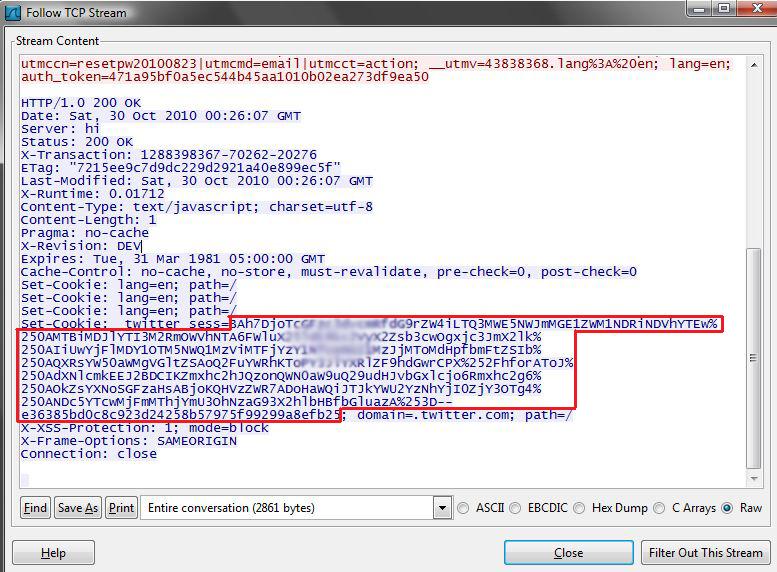
Once you search, a packet, with the word Set-Cookie, will be highlighted; right-click the packet and select “Follow TCP Stream.” This will make it easier to read, when looking at the TCP Stream you will see “Set-Cookie: _twitter_sess=” and then a long string of characters. This is the session cookie that you are going to hijack.

Cookie Session Hijacking Tutorial

Session Cookie Found from TCP Stream

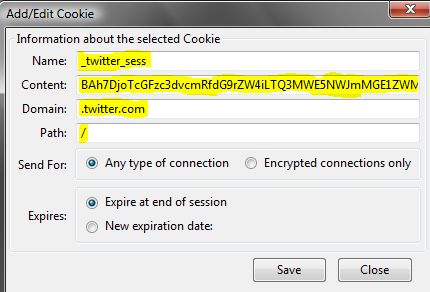
Since we now have the cookie, open Mozilla Firefox and open our Cookie Editor (Tools –> Cookie Editor). Once the Cookie Editor is open, select the Add button under Cookie. For the parameters enter the following:

  • Name: _twitter_sess

  • Content: copy paste the information from the TCP Stream (see the red box in the Session Cookie Found from TCP Stream picture)

  • Domain: .twitter.com

  • Path: /

NewCookie Session Hijacking Tutorial

Entering a New Cookie

After all this information is entered, save the cookie. The next step is to go to the address bar and go to Twitter.com, and just like that you have hijacked another users’ session.

Quick and Dirty Instructions:


  1. Sniff traffic

  2. Log into Twitter with another computer (or same computer)

  3. Stop sniffing traffic

  4. Find a packet that contains Set-Cookie

  5. Open Firefox

  6. Start Cookie Editor add-on

  7. Paste in cookie

  8. Go to Twitter

  9. No need to log in!!

Conclusion


As stated earlier this was a simple example; but as you can see, the same steps can be applied to hijack sessions from other websites. I will give credit to Firesheep, as it made this very easy process even easier and has even made people more aware of the dangers of surfing the web on public networks.
Read More
Powered by Blogger.