Visit our official website APAJR Lab


Showing posts with label Email Hacking. Show all posts

Sunday, 5 May 2013

How to Increase Followers/Subscribers/Likes/Tweets/Plus One onFacebook,Twitter or Google Plus | .::APAJR::.

| |
0 comments
Yea we create Facebook Fan page Start inviting our friends but it all gets boring when only the people we invite like our fan page. But today I will teach you how to increase your Facebook fan page like.

To the main deal
1. Register Here
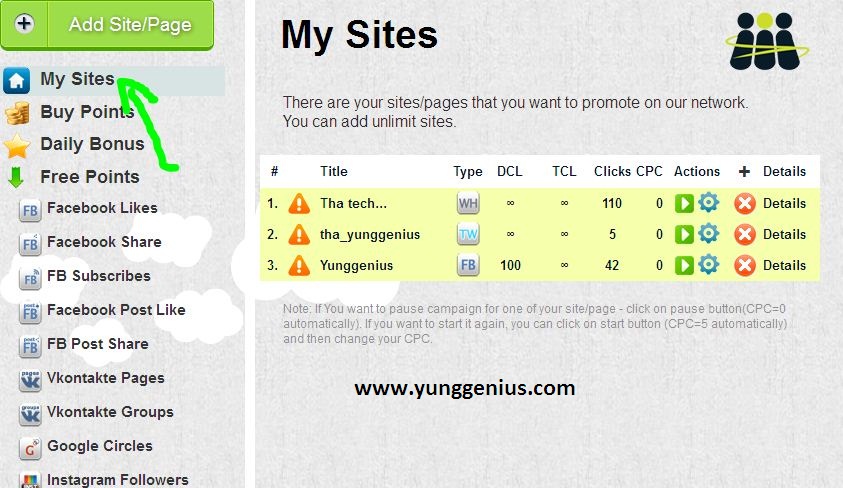
2. Log into your account, then locate Add Site/page(see screenshot below)

3. Now select Facebook likes, and fill up the below form

Now after you might have added your Facebook fan page We move to the next step
How to increase your fan page likes
Now here’s where the real work starts before you can start getting likes to your fan page you first have to get points you can get free points and you can also buy points, well I’ll be talking about how to get free points.
Step 1. Goto the homepage of the site then click on free points

step 2. select the category where you want to get your free points
step 3. After you might have gotten enough points lets say 1000, we now goto where our fanpage is by clicking the “My site” Button

step 4. You set the Cost per click(CPC) NB: the higher your CPC the more likes you get.

Save changes. Now watch your Facebook fan page likes increase.

Having any trouble?? Just use the comment box.


If you found this post useful kindly use the share button.


Read More

Saturday, 2 March 2013

Session Hijacking Twitter Account | Tutorial | .::APAJR::.

| |
0 comments
Recently, there has been a lot of talk about the Firesheep plugin for Mozilla Firefox that allows users to easily perform a session hijacking against victims on the same LAN. The news spread fast and wide, and reporters were deeming Firesheep extremely dangerous.  I am not going to play down the fact that this does pose a serious threat to people’s privacy; however, this is nothing more than an old trick with a new face. Session hijacking has been around for ages, and performing a session hijack is actually quite simple. Today I will demonstrate one way to perform a simple session hijack without Firesheep!


SessionHijack Session Hijacking Tutorial


What is Session Hijacking?


I am not going to waste time trying to explain session hijacking; instead I will just give you a blurb from Wikipedia:
In computer science, session hijacking refers to the exploitation of a valid computer session—sometimes also called a session key—to gain unauthorized access to information or services in a computer system. In particular, it is used to refer to the theft of a magic cookie used to authenticate a user to a remote server. It has particular relevance to web developers, as the HTTP cookies used to maintain a session on many web sites can be easily stolen by an attacker using an intermediary computer or with access to the saved cookies on the victim’s computer (see HTTP cookie theft).

How to Perform a Session Hijack


For this simple example using Windows, I am going to target Twitter (as this seems to be one of the two big targets of Firesheep, and since I refuse to use Facebook). Here are the following things that will be needed for this example:

  1. LAN with Internet connection.

  2. Two computers (technically you could just use one, but it’s more fun to see it work with two).

  3. Wireshark

  4. Mozilla Firefox

  5. Add N’ Edit Cookie Editor add-on (or another cookie editor of your choice)

The first step I am going to take is to start Wireshark and sniffing traffic. Depending on the LAN you may need to perform ARP Spoofing to successfully pull this attack off; if you need to know how to perform an ARP Spoofing attack I would suggest search Google or drop me a line (webmaster[at]veritablelife.com or @aaronbeauregard) and I will help you out.

While sniffing traffic, log into Twitter on the other computer. After you have logged into Twitter, you can stop sniffing traffic and perform a find packet (Ctrl-F or Edit–>Find Packet). For the criteria, set the “By:” option to “String” and the “Search In” option to “Packet details”, and search for “Set-Cookie:” in the text field.

FindPacket Session Hijacking Tutorial

Find Packet options

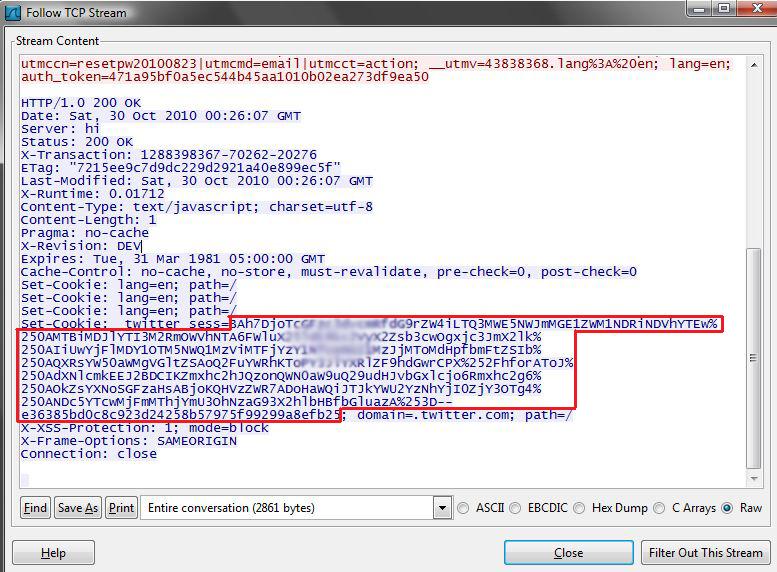
Once you search, a packet, with the word Set-Cookie, will be highlighted; right-click the packet and select “Follow TCP Stream.” This will make it easier to read, when looking at the TCP Stream you will see “Set-Cookie: _twitter_sess=” and then a long string of characters. This is the session cookie that you are going to hijack.

Cookie Session Hijacking Tutorial

Session Cookie Found from TCP Stream

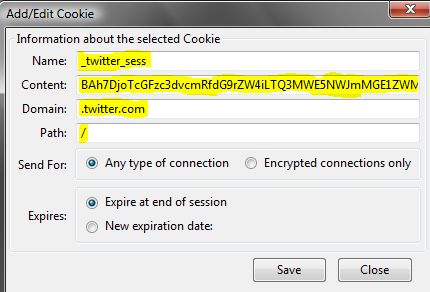
Since we now have the cookie, open Mozilla Firefox and open our Cookie Editor (Tools –> Cookie Editor). Once the Cookie Editor is open, select the Add button under Cookie. For the parameters enter the following:

  • Name: _twitter_sess

  • Content: copy paste the information from the TCP Stream (see the red box in the Session Cookie Found from TCP Stream picture)

  • Domain: .twitter.com

  • Path: /

NewCookie Session Hijacking Tutorial

Entering a New Cookie

After all this information is entered, save the cookie. The next step is to go to the address bar and go to Twitter.com, and just like that you have hijacked another users’ session.

Quick and Dirty Instructions:


  1. Sniff traffic

  2. Log into Twitter with another computer (or same computer)

  3. Stop sniffing traffic

  4. Find a packet that contains Set-Cookie

  5. Open Firefox

  6. Start Cookie Editor add-on

  7. Paste in cookie

  8. Go to Twitter

  9. No need to log in!!

Conclusion


As stated earlier this was a simple example; but as you can see, the same steps can be applied to hijack sessions from other websites. I will give credit to Firesheep, as it made this very easy process even easier and has even made people more aware of the dangers of surfing the web on public networks.
Read More

Tuesday, 26 February 2013

Gmail Session Hijacking in 7steps | .::APAJR::.

| |
0 comments
Session tokens are crown jewels of user identity on a web application. It's no hidden fact that attacks such as XSS (Cross Site Scripting) are on all time rise that steal these tokens leading to user identity theft.

Although adequate community emphasis has been laid on XSS & its countermeasures, there are other prevalent techniques and wide-spread issues that can steal session tokens perhaps more easily.

The one that I share here is network eavesdropping/sniffing.

A vast majority of the web applications that I have come across use HTTP, post authentication. Example: Gmail, Yahoo, Orkut or for that matter any popular public portal. The list includes several intranet/online financial and payroll apps we see day in and day out.

Below we see a step-by-step attack where we steal session ID of a Gmail user and hijack it in the process. (The credit for this exercise is shared with my colleague, Raj, rajaol@gmail.com):

1. The screenshot below simulates a victim (c00kytest@gmail.com) who is currently accessing his/her Gmail account over a corporate LAN, Cyber Cafe' or Wi-fi hotspot. As we see in the URL bar, the communication is happening over HTTP, i.e. plain text.


2. The second screenshot simulates an attacker sitting somewhere in the same LAN. Though the LAN is a switched environment, the attacker has used a tool called Cain & Abel to become man-in-the-middle (MITM) (there are many tools that can be used to set this up. Ettercap is a good example. We use Cain & Abel for our long time friendship with the tool. We have used it to sniff passwords travelling on SMTP and POP on numerous occasions).


The blue circle in the screenshot (IP: 192.168.0.1) highlights the Internet gateway address that we ARP spoof for victim (IP: 192.168.0.110), highlighted in red circle. The second red circle below confirms the success of first step of attack where all victim traffic is getting routed from attacker's machine. By now we should be able to see all traffic going from victim machine.

Let's fire up wireshark to read the victim data (again, you can use any sniffing tools for this) The above screenshot shows wireshark getting started.

3. As shown in the next screenshot we steal victim's gmail cookie details. This is highlighted in the red circle (IP: 192.168.0.110)
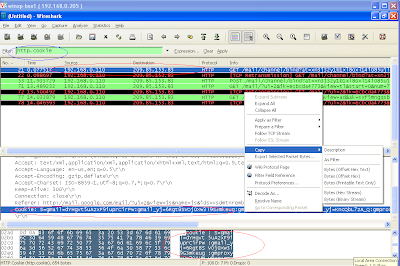


4. We copy the cookie details and paste it on a notepad as shown below


Gmail uses GX token from cookie to track users. It's highlighted in the screenshot above. We just need this value to hijack victim's account.

5. As shown in the screenshot below, we go back to attacker's login (rajaol@gmail.com) and use a firefox add-on called Cookie Editor to insert the stolen cookie.


6. We now paste the stolen GX value in the cookie editor as shown below. (We did some trial and error and removed many other cookies. We also changed token value for gmailchat=c00kytest@gmail.com)


7. Alright. We are done. Now change the URL in the attacker's browser to the one highlighted in the screenshot below (some other gmail links were logging us out directly. This one didn't. There might be others too that could give you the access similarly. It's all trial and error). Gmail shows you logged on as victim !!!
(highlighted in second red circle)


Now that we have seen how simple this attack can be (Wi-fi would be even easier. No ARP spoofing required. It's all broadcast. On top of that many still use WEP. WEP is trivial to crack) and the associated threats, let's look at the countermeasures.

Countermeasures:

1. Use HTTPS
CAVEAT: On a switched LAN, MITM is still possible but your browser will warn you. It will show a certificate error. Users need to take this error seriously and alert the support/security staff. Gmail provides optional email access over https://gmail.com but it is insufficient as it makes other requests over HTTP. Nevertheless you will get a browser warning as soon as the MITM happens (certificate error). You can act upon it accordingly. Yahoo & majority of the other public portals do not provide options HTTPS access.

2. If HTTPS is not possible for performance reasons, use multiple cookies & continuous (page-wise or request-wise) tracking mechanism that detects a sudden new connection & logs out the user automatically.
CAVEAT: This might still be breakable by an attacker if the MITM started before victim's first access to the site.
Read More
Powered by Blogger.