Visit our official website APAJR Lab


Tuesday, 19 February 2013

Learning SEO Online, the Best Places to Get Started | .::APAJR::.

| |
0 comments
I always have to chuckle when people ask me what university or school I went to learn SEO. As far as I’m aware, there are still no accredited courses available for learning SEO anywhere. The web itself however is a great place to start, and even though you won’t end up with an official degree in SEO, the hands-on experience you get is priceless, especially when you’re able to deliver results for your company.

Learning SEO online

Some of my favorite places to sharpen SEO skills can be found below:

DistilledU


The SEO geniuses at Distilled started the Distilled U program about six months ago and it has become the go-to tool for every new SEO that we hire at the moment. The online training modules currently span nearly 50 hours and they cover everything from Search Engine basics to On-page optimization to Keyword Research and Link Analysis. All this is just in the 101 section – once you’re finished soaking up all that knowledge, the next level up is “Further SEO” which extensively covers advanced topics such as Linkbait, Content Strategies and Structured Data.

SEOmoz


No list would be complete without the essential Beginners Guide to SEO which SEOmoz has been managing and updating for several years now. The guide is only one part of the vast amount of “know-how”that can be found in the Q&A section and the blogs, both the SEOmoz and the Youmoz edition. And, be sure to tune in to the famous Whiteboard Friday sessions when you can.

SEOTools


A relatively new kid on the block, created by an old-school SEO legend, Aaron Wall. The SEOTools.net site aims to provide industry insights and introduction overviews of SEO related topics. Aaron of course also runs one of the most respected SEO communities and and SEO training courses online. This isn’t a free option, but I have been told it’s one of the best ways to spend money if you want to learn how to make money. Also make sure you check out the free toolset that he’s made available for free.

Link Building Course by PointblankSEO


Jon Cooper, an up and comer in the SEO industry, loves building links. Jon’s thrown all his experience into this well presented link building course. I signed up about a month ago and it is hands down one of the most comprehensive courses when it comes to link building, which should be an integral part of any SEO campaign. If you don’t believe me, just have a look at the names that are recommending the course on his signup page.

Inbound Marketing University


Hubspot is a fantastic platform but they also a very rich source of SEO information. The whitepapers, casestudies and ebooks which they put up for free are full of valuable and actionable advice. You can even become a certified inbound marketer if you run through the program which they maintain.

A special mention goes to the LinkMoses  private newsletter by Eric Ward, which is always filled with pearls of link building wisdom and link opportunities. Another subscription I highly recommend comes from Michael Martinez’s Premium Newsletter. He covers a lot of ground with every edition, ranging from technical SEO advice to SEO experiments and insights.

As useful as these resources will prove, at the end of the day it still comes down to getting your hands dirty. Make sure that you won’t turn into a “good on paper” SEO, but that you hone your skills with real world experience.

Finally, I’d love to hear from you guys where you’ve picked up your SEO skills. Share the knowledge and leave a comment.
Read More

Get Started with the Beginner's Guide to SEO | .::APAJR::.

| |
0 comments
Beginner's Guide to SEO


New to SEO? Need to polish up your knowledge? The Beginner's Guide to SEO has been read over 1 million times and provides comprehensive information you need to get on the road to professional quality SEO.

What is Search Engine Optimization (SEO)?


SEO is the practice of improving and promoting a web site in order to increase the number of visitors the site receives from search engines. There are many aspects to SEO, from the words on your page to the way other sites link to you on the web. Sometimes SEO is simply a matter of making sure your site is structured in a way that search engines understand.

Search Engine Optimization isn't just about "engines." It's about making your site better for people too. At SEOmoz we believe these principles go hand in hand.

This guide is designed to describe all areas of SEO - from discovery of the terms and phrases (keywords) that generate traffic, to making a site search engine friendly, to building the links and marketing the unique value of the site/organization's offerings. Don't worry, if you are confused about this stuff, you are not alone.
Search Engine Market Share

Why does my website need SEO?


The majority of web traffic is driven by the major commercial search engines - Google, Bing and Yahoo!. Although social media and other types of traffic can generate visits to your website, search engines are the primary method of navigation for most Internet users. This is true whether your site provides content, services, products, information or just about anything else.

Search engines are unique in that they provided targeted traffic - people looking for what you offer. Search engines are the roadways that makes this happen. If your site cannot be found by search engines or your content cannot be put into their databases, you miss out on incredible opportunities available to websites provided via search.

Search queries, the words that users type into the search box, carry extraordinary value. Experience has shown that search engine traffic can make (or break) an organization's success. Targeted visitors to a website can provide publicity, revenue, and exposure like no other channel of marketing. Investing in SEO, whether through time or finances, can have an exceptional rate of return compared to other types of marketing and promotion.


Search Engine Traffic


Why can't the search engines figure out my site without SEO?


Search engines are smart, but they still need help. The major engines are always working towards improving their technology to crawl the web more deeply and return better results to users. However, there is a limit to how search engines can operate. Whereas the right SEO can net you thousands of visitors and attention, the wrong moves can hide or bury your site deep in the search results where visibility is minimal.

In addition to making content available to search engines, SEO also helps boost rankings so that content will be placed where searchers will more readily find it. The Internet is becoming increasingly competitive, and those companies who perform SEO will have a decided advantage in visitors and customers.

Can I do SEO for myself?


The world of SEO is complex, but most people can easily understand the basics. Even a small amount of knowledge can make a big difference. For the most part, SEO education is free and available on the web, including guides like this. Combine this with a little practice and you are well on your way to becoming a guru.

Depending on your time commitment, willingness to learn, and complexity of your website(s), you may decide you need an expert to handle things for you. Firms that practice SEO can vary; some have a highly specialized focus, while others take a more broad and general approach. Optimizing a web site for search engines can require looking at so many unique elements that many practitioners of SEO (SEOs) consider themselves to be in the broad field of optimization and website strategy.

Still, even in this case, it's good to have a firm grasp of the core concepts.

How much of this article do I need to read?


If you are serious about improving search traffic and are unfamiliar with SEO, we recommend reading this guide front-to-back. It's short and easy to understand. There's a printable PDF version for those who'd prefer, and dozens of linked-to resources on other sites and pages that are worthy of your attention. Because you've given us your attention, we've attempted to remain faithful to Mr. William Strunk's famous quote:


"A sentence should contain no unnecessary words, a paragraph no unnecessary sentences, for the same reason that a drawing should have no unnecessary lines and a machine no unnecessary parts."


Every section of this guide is critical to understanding the most effective practices of search engine optimization.

Read More

Monday, 18 February 2013

Nobody can create a FOLDER anywhere on the computer which can be namedas “CON”. | .::APAJR::.

| |
0 comments
[caption id="attachment_21" align="alignnone" width="470"]join us group http://www.facebook.com/groups/Apajrengineerhackers/[/caption]


I got an interesting mail that claims

nobody can create a FOLDER anywhere on the computer which can be named as “CON”.
This is something pretty cool…and unbelievable… At Microsoft the whole Team, including Bill Gates, couldn’t answer why this happened!
TRY IT NOW !!


This is not the first time I got this mail, and I’m sure most of you must have received it too. If you try creating a folder named CON, as the mail claims, it’ll get renamed automatically to New Folder. But there is no mystery behind this, and the team at Microsoft very well knows the reason for this. 


Before we proceed further, let me tell you a small secret you can’t even create a folder named PRN, AUX, NUL and many others.

The reason you can’t create a folder with these names is because these are reserved keywords used by DOS. The below screen-shot taken from Microsoft’s website shows a list of reserved keywords in DOS.


If you try creating a folder with any of these names, the name automatically changes back to the default “New Folder”. And this is what has caused the confusion. Instead of automatically renaming the folder, had an explanatory warning message popped up, we would have had one less hoax mail to deal with.


There is actually a way to create a folder named CON, or any other name from the above list of reserved keywords. This can be done through command prompt. But it is advisable not to do so, as it might result in your system becoming unstable.

  • To create a folder named CON, go to command prompt and type “MD \.D:CON” (without quotes). This will create a folder named CON in D:. See the screenshot of my machine.


You cannot delete this folder by normal delete. To delete the folder, again go to command prompt and type “RD \.D:CON” without quotes.

  • I’ll again recommend you not to try this on your system, as it might become unstable. In case you can’t stop yourself, don’t do it on a drive on which Windows is installed (generally C:).

Next time when you get such a mail, reply to the sender and direct him or her to this page.

Have you ever come across such hoax mails? Do let us know what do you do to tackle them through your comments.


You can also contact me at facebook

Facebook Profile : http://www.facebook.com/maurya.ashish.apajr?ref=tn_tnmn

You can also join our group to learn Hacking and Computer science..

Facbook group : http://www.facebook.com/groups/255805587869465/


Read More

Text message Hide in Image | .::APAJR::.

| |
0 comments


anonymous
Hi Guys. Today we will see how to hide Text Message in any image file.
This is an awesome trick and very easy one too. IF you wish to send a text messega to you friends privately or you yourself want to hide a text message in image file then this article will help you a lot.

After hiding the message in a image file there will be no damage to the file just the size of the file will increase a bit.

So lets check how it is done.

First of all open run and type cmd., click enter. This will open Command promt.
Now you have to navigate to the folder where you have copied the files(1 .jpg file and 1 txt file which contains your message.)

For example, if your files are in "D" drive, then after opening cmd, type, D: and hit enter, now you are in your d drive, now if your folder name is Photos then type "cd photos" (without quotes) now you are in photos folder.

Now main step. Type this command after navigating to the folder.

copy /b imagefilename.jpg + textfilename.txt outputimagename.jpg
Type the exact code, but dont forgot to replace the few words, imagefilename.jpg with your image file name and with proper extension, textfilename.txt with your text file, outputimagename.jpg your output image name, use whatever you want, but remember to use right extension.
All done by now your message has been hiden in you image and a new folder will be created in the same folder with the name you wrote in place of outputimagename.jpg.

As everything is done by now. you must be thinking how to view the message now.
dont worry we will see that too. its very simple .
You just have to open the output file with notepad, scroll down to the bottom. check the last line.
you message will be displayed there.

If you have any problem with this plz feel free to comment below with you issue.

Thank you. :)
Read More

Friday, 8 February 2013

Session Hijacking Facebook Accounts | .::APAJR::.

| |
0 comments
This is a tutorial that demonstrates just how simple it is to get access to facebook accounts without the user's password or username. This tutorial demonstrates Session Hijacking (discussed here: : www.facebook.com/APAJREngineerHackers  or  http://www.facebook.com/groups/Apajrengineerhackers/ ).  This is a simple attack done on an unsecured wifi network with the permission of all users on the network.

The aims of this tutorial are:

  • Educate users on the dangers of using unsecured wireless connections.

  • Educate wireless connections managers in the aim that they will protect their wireless network.

  • Demonstrate the simplicity of this attack and why there is need to find a solution for this attack.

  • Get users to stop using unsecure wireless connections.

Requirements:

  • Someone on the network must be on facebook at the time for you to steal their session information.

  • You Wi-Fi adapter must have monitor mode support in order to scan all packets transferred over a network. If it doesn't, you would only be scanning your own packets. To learn more about monitor mode and about enabling monitor mode on your Wireless card, visit http://www.aircrack-ng.org/doku.php?id=airmon-ng

So here is a step by step explanation of how to carry out this attack:

=> First of all, you would need to connect to an unsecured wireless connection that others are using. Then we start capturing packets transferred over this network. Note that your wireless adapter needs to support monitor mode to scan all packets transferred over a network. you can check your wi-fi card specifications to see if it supports monitor mode.

=>We would then need to use a network sniffing tool so sniff packets transferred over the network. In this case, I am using a tool called Wireshark (http://www.wireshark.org). Within wireshark, there is a menu called "Capture"; Under the capture menu, select interfaces from that menu, and a list of your interfaces will come up:


=> Next you select Start Next to the interface that you have enabled monitor mode on. most times it is the interface that is capturing the most packets. In my case, Microsoft interface is capturing the most packets, so i will select to start capturing with the microsoft interface. You would leave wireshark to capture packets for a couple of seconds depending on the amount of persons currently using the network. Say 30 seconds if 10 people currently are using the network, or 30 minutes if there is barely network activity going on. While capturing, wireshark will look something like this:


=> After capturing a certain amount of packets, or running the capture for a certain amount of time, stop it by clicking on the stop current capture button.


=> After stopping the capture, you will need to look for the user's facebook session cookie which, hopefully was transferred in one of the packets captured. to find this cookie, use the wireshark search which can be found by pressing "ctrl + f" on your keyboard. In this search interface, select Find: By "String"; Search In: "Packet Details". and Filter by the string "Cookie".


=> When you press find, if there is a cookie, this search will find it, if no cookie was captured, you will have to start back at step 2. However, if youre lucky and some cookies we're captured, when you search for cookie, your interface will come up looking like this in the diagram below. You would notice the cookie next to the arrow contains lots of data, to get the data. the next thing you do is to right click on the cookie and click copy->description.


=> After copying the description, paste it in a text file, and separate each variable to a new line (note the end of every variable is depicted by a semicolon eg - c_user=100002316516702;).

=> After some research and experimenting, i figured out that facebook authenticated the user session by 2 cookies called c_user and xs. Therefore you will only need the values of these cookies, and then need to inject them into your browser. Before injecting the cookies, here is what my facebook page looked like:


=> The next thing you would need to do is to inject this information as your own cookie. so firstly you would need to install a cookie manager extension for your browser, I'm using firefox Cookie Manager. After installing this extension, you will find it under Tools->cookie manager. The interface for cookie manager looks like this:


=> The first thing we would need to do is to clear all cookies, so clear all the cookies you currently have. Then select the "Add Cookie" link to add a new cookie. The first cookie you will add is the c_user cookie which will have the following information:: Domain - ".facebook.com", name-"c_user", value-"the value you copied earlier from the wireshark scanning" and the Path-"/"; leave the isSecure and Expires On values to default:


=> The next thing you do is to hit the "Add" button and the cookie is saved. Repeat the same steps to add the xs cookie with all of the same information, except the value, which would be the xs value you have.


=> After adding these 2 cookies, just go to facebook.com, refresh the page and... Boom!! you will see you are logged in as that user whose cookie information you stole. Here is my facebook page after i injected those cookies:


Read More

Top 10 Ways to Hack Facebook Accounts | .::APAJR::.

| |
0 comments


Facebook is one of the most widely used social networking site with more than 750 million users, as a reason if which it has become the number 1 target of hackers have , I have written a couple of post related to facebook hacking here. I mentioned the top methods which were used by hackers to hack facebook accounts, however lots of things have changed in 2013, Lots of methods have went outdated or have been patched up by facebook and lots of new methods have been introduced, So in this post I will write the top 10 methods how hackers can hack facebook accounts.

10 Ways How Hackers Can Hack Facebook Accounts


So here are the top 10 methods which have been the most popular in 2012:


1. Facebook Phishing 


Phishing still is the most popular attack vector used for hacking facebook accounts, There are variety of methods to carry out phishing attack, In a simple phishing attacks a hacker creates a fake login page which exactly looks like the real facebook page and then asks the victim to login into that page, Once the victim logins through the fake page the victims "Email Address" and "Password" is stored in to a text file, The hacker then downloads the text file and get's his hands on the victims credentials.


2. Keylogging 


Keylogging, according to me is the easiest way to hack a facebook password, Keylogging sometimes can be so dangerous that even a person with good knowledge of computers can fall for it. A keylogger is basically a small program which once is installed on victims computer will record every thing which victim types on his/her computer. The logs are then send back to the attacker by either FTP or directly to hackers email address.


3. Stealers 


Almost 80% percent people use stored passwords in their browser to access the facebook, This is is quite convenient but can sometimes be extremely dangerous, Stealers are software's specially designed to capture the saved passwords stored in the victims browser, Stealers once FUD can be extremely powerful.


4. Session Hijacking


Session Hijacking can be often very dangerous if you are accessing Facebook on a http:// connection, In a Session Hijacking attack a hacker steals the victims browser cookie which is used to authenticate a user on a website and uses to it to access victims account, Session hijacking is widely used on Lan's.


5. Sidejacking With Firesheep


Sidejacking attack went common in late 2010, however it's still popular now a days, Firesheep is widely used to carry out sidejacking attacks, Firesheep only works when the attacker and victim is on the same wifi network. A sidejacking attack is basically another name for http session hijacking, but it's more targeted towards wifi users.


6. Mobile Phone Hacking


Millions of Facebook users access Facebook through their mobile phones. In case the hacker can gain access to the victims mobile phone then he can probably gain access to his/her Facebook account. Their are lots of Mobile Spying softwares used to monitor a Cellphone.

7. DNS Spoofing 

If both the victim and attacker are on the same network, an attacker can use a DNS spoofing attack and change the original facebook.com page to his own fake page and hence can get access to victims facebook account.


8. USB Hacking 
Usb password stealer

If an attacker has physical access to your computer, he could just insert a USB programmed with a function to automatically extract saved passwords in the browser, I have also posted related to this attack which you can read by accessing the link below:


9. Man In the Middle Attacks

If the victim and attacker are on the same lan and on a switch based network, A hacker can place himself b/w the client and the server or he could also act as a default gateway and hence capturing all the traffic in between, ARP Poisoning which is the other name for man in the middle attacks is a very broad topic and is beyond the scope of this article,


10. Botnets 

Botnets are not commonly used for hacking facebook accounts, because of it's high setup costs, They are used to carry more advanced attacks, A botnet is basically a collection of compromised computer, The infection process is same as the keylogging, however a botnet gives you, additional options in for carrying out attacks with the compromised computer. Some of the most popular botnets include Spyeye and Zeus.
Read More

How to Hack Facebook Accounts With Reverting | .::APAJR::.

| |
1 comments


Facebook pays millions of dollars to security experts and penetration tester to keep the privacy of their users as safe as possible. So therefore we cannot use direct methods such as bruteforcing, dictionary attacks in order to hack facebook account due to account lockout feature. However, Also i would like to clear one more doubt that there is no such software which will hack a facebook password for you by just entering your email address. There are also methods such as Phishing, keylogging etc, which can help you hack facebook account, which are also suggested ones.

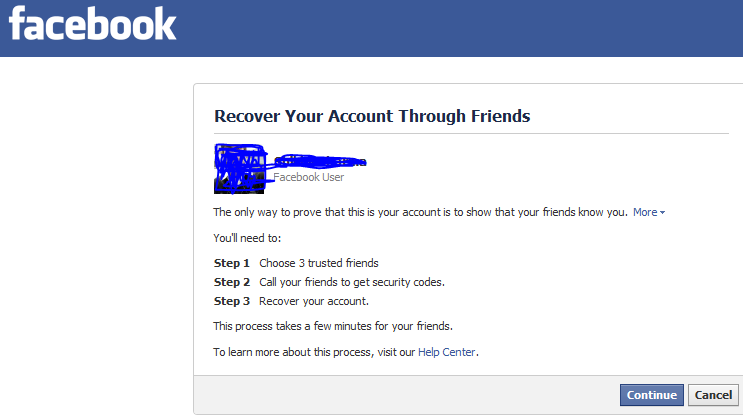
However here in this tutorial we will be exploiting a bug inside facebook in order to hack a facebook account. The vulnerability exploits trusted friends feature inside facebook which could be used to reset some one's facebook password.


1. The thing which we use is to trick the Three Friend Account Recovery Method of facebook


2. The homework i was talking about is that you will have to make three fake account and make sure that they are in the friend list of the person you want to hack.


3. Once you are done with the above two steps you can start the hacking business.


4. Go to Forgot Password area of facebook.


5. It will show victims e-mail address and may be mobile phone at which he can be reached,choose ''no longer access to these'' option.


6. Now you will be prompted to enter an alternate e-mail address, type your e-mail address or create a new one.


7. Now you will be asked the ''Security question". Make random guesses,if you know the victim you might just get the right answer,if you don't-no worries !


8. If you have not succeeded in getting the answer right you will get to our main aim ''The Trusted Friends" recovery option.


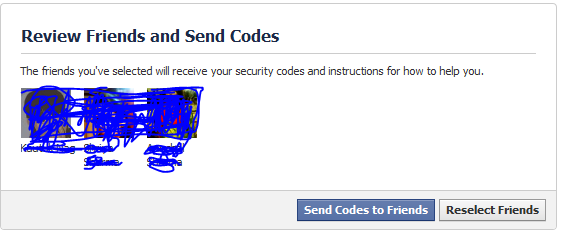
9. Here click on ''continue'',choose  3 trusted friends-The Three fake accounts you have created and they are friends with the victim.


http://apajrethicalhackingcourse.files.wordpress.com/2013/02/capture1.png?w=300


10. After you have chosen them,facebook will supply you with some codes on those fake accounts,follow the procedure and victims account is yours ! You've hacked them ! :)


Also Read : http://apajrethicalhackingcourse.wordpress.com/2013/03/02/hack-facebook-account-forget-password-trick/

Read More
Powered by Blogger.